설치 전 준비 단계
준비 파일
p6880880_190000_Linux-x86-64.zip
p31537677_112040_Linux-x86-64.zip
LINUX.X64_193000_db_home.zip
LINUX.X64_193000_grid_home.zip
setting 정보
# 1번 node
hostname : orac1
oracle_sid : ora19c1
ip : 192.168.56.140

# 2번 node
hostname : orac2
oracle_sid : ora19c2
ip : 192.168.56.150

# /etc/hosts 파일 작성 (호스트명에는 '_' 가 포함되면 안됨)
ip setting  /etc/hosts
##### RAC Public #####
192.168.56.140  orac1
192.168.56.150  orac2
##### RAC Private #####
100.100.100.1    orac1-priv
100.100.100.2    orac2-priv
##### RAC Vip #####
192.168.56.131  orac1-vip
192.168.56.132  orac2-vip
##### RAC Scan #####
192.168.56.200  orac-scan
참고
재부팅시 disk 소유권이 root 로 자동전환 될수 있으므로 아래 작성된 내용을 적용하여 파일의 소유권을 bonding 필요.
2023.05.23 - [Oracle/Management] - OS booting disk bonding 자동 적용 (udev / rc.local)
GRID 설치 진행
1. grid 계정으로 접속하여 $GRID_HOME 에 압축 파일 해제 (node 1 에만 진행)
1번 node 에 설치 경로 생성 및 압축 파일 해제
$ unzip LINUX.X64_193000_grid_home.zip -d $ORACLE_HOME
2. cvuqdisk 패키지 설치 (설치 파일을 해제하면 안에 존재) (root 계정으로 패키지 설치)
. 해당 .rpm 파일을 node2 에도 옮겨서 설치
$ cd $ORACLE_HOME/cv/rpm
rpm -ivh cvuqdisk-*.rpm
3. 패스워드를 사용하지 않고 다른 노드로 접속가능하도록 설정 (ssh 접속 설정 - node 1 에만 진행)
grid_env
cd $GRID_HOME/oui/prov/resources/scripts
./sshUserSetup.sh -user grid -hosts "orac1 orac2" -noPromptPassphrase -advanced
출력 내용 확인
orac1:/oracle_grid/product/19c/grid_1] cd oui/prov/resources/scripts/ orac1:/oracle_grid/product/19c/grid_1/oui/prov/resources/scripts] ls -al
total 108
drwxr-x---. 2 grid dba 117 Apr 17 2019 .
drwxr-xr-x. 3 grid dba 4096 Apr 17 2019 ..
-rwxr-x---. 1 grid dba 6729 Jun 28 2016 ouiSetup
-rwxr-x---. 1 grid dba 16520 Apr 1 2009
sshConnectivity.sh
-rwxr-x---. 1 grid dba 33333 Jan 7 2015
sshUserSetup.sh
-rwxr-x---. 1 grid dba 35064 Dec 12 2006
sshUserSetupNT.sh
-rwxr-x---. 1 grid dba 1394 Jul 20 2006 validatePaths orac1:/oracle_grid/product/19c/grid_1/oui/prov/resources/scripts] ./sshUserSetup.sh -user grid -hosts "orac1 orac2" -noPromptPassphrase -advanced
The output of this script is also logged into /tmp/sshUserSetup_2023-01-04-19-05-14.log
Hosts are orac1 orac2
user is grid
Platform:- Linux
Checking if the remote hosts are reachable
PING orac1 (192.168.56.140) 56(84) bytes of data.
64 bytes from orac1 (192.168.56.140): icmp_seq=1 ttl=64 time=0.064 ms
64 bytes from orac1 (192.168.56.140): icmp_seq=2 ttl=64 time=0.082 ms
64 bytes from orac1 (192.168.56.140): icmp_seq=3 ttl=64 time=0.074 ms
64 bytes from orac1 (192.168.56.140): icmp_seq=4 ttl=64 time=0.088 ms
64 bytes from orac1 (192.168.56.140): icmp_seq=5 ttl=64 time=0.092 ms
--- orac1 ping statistics ---
5 packets transmitted, 5 received, 0% packet loss, time 4249ms
rtt min/avg/max/mdev = 0.064/0.080/0.092/0.010 ms
PING orac2 (192.168.56.150) 56(84) bytes of data.
64 bytes from orac2 (192.168.56.150): icmp_seq=1 ttl=64 time=0.918 ms
64 bytes from orac2 (192.168.56.150): icmp_seq=2 ttl=64 time=1.33 ms
64 bytes from orac2 (192.168.56.150): icmp_seq=3 ttl=64 time=1.18 ms
64 bytes from orac2 (192.168.56.150): icmp_seq=4 ttl=64 time=2.12 ms
64 bytes from orac2 (192.168.56.150): icmp_seq=5 ttl=64 time=1.38 ms
--- orac2 ping statistics ---
5 packets transmitted, 5 received, 0% packet loss, time 4071ms
rtt min/avg/max/mdev = 0.918/1.386/2.120/0.403 ms
Remote host reachability check succeeded.
The following hosts are reachable: orac1 orac2.
The following hosts are not reachable: .
All hosts are reachable. Proceeding further...
firsthost orac1
numhosts 2
The script will setup SSH connectivity from the host orac1 to all
the remote hosts. After the script is executed, the user can use SSH to run
commands on the remote hosts or copy files between this host orac1
and the remote hosts without being prompted for passwords or confirmations.
NOTE 1:
As part of the setup procedure, this script will use ssh and scp to copy
files between the local host and the remote hosts. Since the script does not
store passwords, you may be prompted for the passwords during the execution of
the script whenever ssh or scp is invoked.
NOTE 2:
AS PER SSH REQUIREMENTS, THIS SCRIPT WILL SECURE THE USER HOME DIRECTORY
AND THE .ssh DIRECTORY BY REVOKING GROUP AND WORLD WRITE PRIVILEGES TO THESE
directories.
Do you want to continue and let the script make the above mentioned changes (yes/no)?
yes
The user chose yes
User chose to skip passphrase related questions.
Creating .ssh directory on local host, if not present already
Creating authorized_keys file on local host
Changing permissions on authorized_keys to 644 on local host
Creating known_hosts file on local host
Changing permissions on known_hosts to 644 on local host
Creating config file on local host
If a config file exists already at /home/grid/.ssh/config, it would be backed up to /home/grid/.ssh/config.backup.
Creating .ssh directory and setting permissions on remote host orac1
THE SCRIPT WOULD ALSO BE REVOKING WRITE PERMISSIONS FOR group AND others ON THE HOME DIRECTORY FOR grid.
THIS IS AN SSH REQUIREMENT.
The script would create ~grid/.ssh/config file on remote host orac1. If a config file exists already at ~grid/.ssh/config, it would be backed up to ~grid/.ssh/config.backup.
The user may be prompted for a password here since the script would be running SSH on host orac1.
Warning: Permanently added 'orac1,192.168.56.140' (ECDSA) to the list of known hosts.
grid@orac1's password:
Done with creating .ssh directory and setting permissions on remote host orac1.
Creating .ssh directory and setting permissions on remote host orac2 THE SCRIPT WOULD ALSO BE REVOKING WRITE PERMISSIONS FOR group AND others ON THE HOME DIRECTORY FOR grid.
THIS IS AN SSH REQUIREMENT.
The script would create ~grid/.ssh/config file on remote host orac2. If a config file exists already at ~grid/.ssh/config, it would be backed up to ~grid/.ssh/config.backup.
The user may be prompted for a password here since the script would be running SSH on host orac2.
Warning: Permanently added 'orac2,192.168.56.150' (ECDSA) to the list of known hosts.
Done with creating .ssh directory and setting permissions on remote host orac2.
Copying local host public key to the remote host orac1
The user may be prompted for a password or passphrase here since the script would be using SCP for host orac1.
grid@orac1's password:
Done copying local host public key to the remote host orac1
Copying local host public key to the remote host orac2
The user may be prompted for a password or passphrase here since the script would be using SCP for host orac2.
Done copying local host public key to the remote host orac2
Creating keys on remote host orac1 if they do not exist already. This is required to setup SSH on host orac1.
Creating keys on remote host orac2 if they do not exist already. This is required to setup SSH on host orac2.
Updating authorized_keys file on remote host orac1
Updating known_hosts file on remote host orac1
Updating authorized_keys file on remote host orac2
Updating known_hosts file on remote host orac2
cat: /home/grid/.ssh/known_hosts.tmp: No such file or directory
cat: /home/grid/.ssh/authorized_keys.tmp: No such file or directory
SSH setup is complete.
-----------------------------------------------------------------------------------
Verifying SSH setup
=======================
The script will now run the date command on the remote nodes using ssh
to verify if ssh is setup correctly. IF THE SETUP IS CORRECTLY SETUP,
THERE SHOULD BE NO OUTPUT OTHER THAN THE DATE AND SSH SHOULD NOT ASK FOR
PASSWORDS. If you see any output other than date or are prompted for the
password, ssh is not setup correctly and you will need to resolve the
issue and set up ssh again.
The possible causes for failure could be:
1. The server settings in /etc/ssh/sshd_config file do not allow ssh
for user grid.
2. The server may have disabled public key based authentication.
3. The client public key on the server may be outdated.
4. ~grid or ~grid/.ssh on the remote host may not be owned by grid.
5. User may not have passed -shared option for shared remote users or
may be passing the -shared option for non-shared remote users.
6. If there is output in addition to the date, but no password is asked,
it may be a security alert shown as part of company policy. Append the
additional text to the <OMS HOME>/sysman/prov/resources/ignoreMessages.txt file.
-----------------------------------------------------------------------------------
--orac1:--
Running /usr/bin/ssh -x -l grid orac1 date to verify SSH connectivity has been setup from local host to orac1.
IF YOU SEE ANY OTHER OUTPUT BESIDES THE OUTPUT OF THE DATE COMMAND OR IF YOU ARE PROMPTED FOR A PASSWORD HERE, IT MEANS SSH SETUP HAS NOT BEEN SUCCESSFUL. Please note that being prompted for a passphrase may be OK but being prompted for a password is ERROR.
Wed Jan 4 19:05:38 KST 2023
-----------------------------------------------------------------------------------
--orac2:--
Running /usr/bin/ssh -x -l grid orac2 date to verify SSH connectivity has been setup from local host to orac2.
IF YOU SEE ANY OTHER OUTPUT BESIDES THE OUTPUT OF THE DATE COMMAND OR IF YOU ARE PROMPTED FOR A PASSWORD HERE, IT MEANS SSH SETUP HAS NOT BEEN SUCCESSFUL. Please note that being prompted for a passphrase may be OK but being prompted for a password is ERROR.
Wed Jan 4 19:05:39 KST 2023
-----------------------------------------------------------------------------------
-----------------------------------------------------------------------------------
Verifying SSH connectivity has been setup from orac1 to orac1
IF YOU SEE ANY OTHER OUTPUT BESIDES THE OUTPUT OF THE DATE COMMAND OR IF YOU ARE PROMPTED FOR A PASSWORD HERE, IT MEANS SSH SETUP HAS NOT BEEN SUCCESSFUL.
Wed Jan 4 19:05:39 KST 2023
-----------------------------------------------------------------------------------
-----------------------------------------------------------------------------------
Verifying SSH connectivity has been setup from orac1 to orac2
IF YOU SEE ANY OTHER OUTPUT BESIDES THE OUTPUT OF THE DATE COMMAND OR IF YOU ARE PROMPTED FOR A PASSWORD HERE, IT MEANS SSH SETUP HAS NOT BEEN SUCCESSFUL.
Wed Jan 4 19:05:41 KST 2023
-----------------------------------------------------------------------------------
-Verification from complete-
SSH verification complete.
orac1:/oracle_grid/product/19c/grid_1/oui/prov/resources/scripts]
4. 클러스터 구성 환경 사전 검증 진행 (node 1 에만 진행)
cd $GRID_HOME
./runcluvfy.sh stage -pre crsinst -n orac1,orac2 -osdba dba -orainv dba -fixup -method root -networks enp0s3/enp0s8 -verbose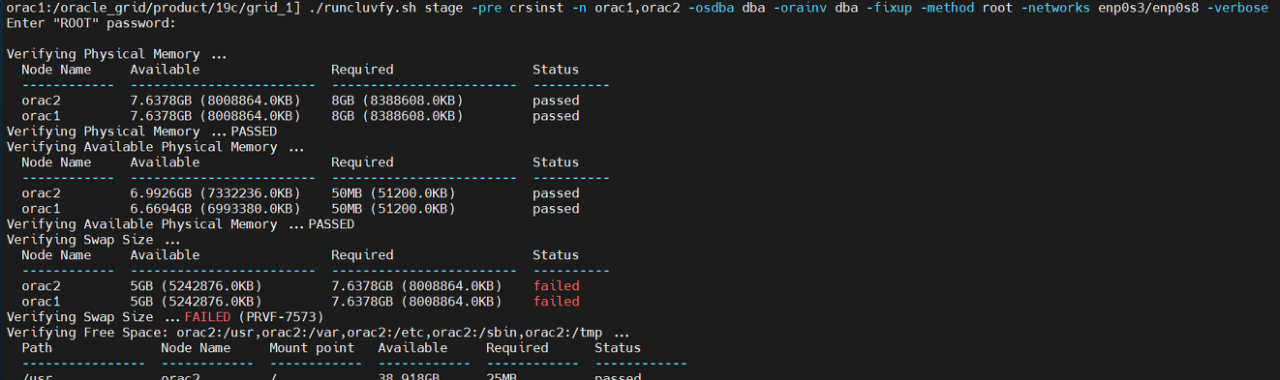
출력 내용 확인
orac1:/oracle_grid/product/19c/grid_1] ./runcluvfy.sh stage -pre crsinst -n orac1,orac2 -osdba dba -orainv dba -fixup -method root -networks enp0s3/enp0s8 -verbose
Enter "ROOT" password:
Verifying Physical Memory ...
Node Name Available Required Status
------------ ------------------------ ------------------------ ----------
orac2 7.6378GB (8008864.0KB) 8GB (8388608.0KB) passed
orac1 7.6378GB (8008864.0KB) 8GB (8388608.0KB) passed
Verifying Physical Memory ...PASSED
Verifying Available Physical Memory ...
Node Name Available Required Status
------------ ------------------------ ------------------------ ----------
orac2 6.9926GB (7332236.0KB) 50MB (51200.0KB) passed
orac1 6.6694GB (6993380.0KB) 50MB (51200.0KB) passed
Verifying Available Physical Memory ...PASSED
Verifying Swap Size ...
Node Name Available Required Status
------------ ------------------------ ------------------------ ----------
orac2 5GB (5242876.0KB) 7.6378GB (8008864.0KB) failed
orac1 5GB (5242876.0KB) 7.6378GB (8008864.0KB) failed
Verifying Swap Size ...FAILED (PRVF-7573)
Verifying Free Space: orac2:/usr,orac2:/var,orac2:/etc,orac2:/sbin,orac2:/tmp ...
Path Node Name Mount point Available Required Status
---------------- ------------ ------------ ------------ ------------ ------------
/usr orac2 / 38.918GB 25MB passed
/var orac2 / 38.918GB 5MB passed
/etc orac2 / 38.918GB 25MB passed
/sbin orac2 / 38.918GB 10MB passed
/tmp orac2 / 38.918GB 1GB passed
Verifying Free Space: orac2:/usr,orac2:/var,orac2:/etc,orac2:/sbin,orac2:/tmp ...PASSED
Verifying Free Space: orac1:/usr,orac1:/var,orac1:/etc,orac1:/sbin,orac1:/tmp ...
Path Node Name Mount point Available Required Status
---------------- ------------ ------------ ------------ ------------ ------------
/usr orac1 / 23.5967GB 25MB passed
/var orac1 / 23.5967GB 5MB passed
/etc orac1 / 23.5967GB 25MB passed
/sbin orac1 / 23.5967GB 10MB passed
/tmp orac1 / 23.5967GB 1GB passed
Verifying Free Space: orac1:/usr,orac1:/var,orac1:/etc,orac1:/sbin,orac1:/tmp ...PASSED
Verifying User Existence: grid ...
Node Name Status Comment
------------ ------------------------ ------------------------
orac2 passed exists(1001)
orac1 passed exists(1001)
Verifying Users With Same UID: 1001 ...PASSED
Verifying User Existence: grid ...PASSED
Verifying Group Existence: asmadmin ...
Node Name Status Comment
------------ ------------------------ ------------------------
orac2 passed exists
orac1 passed exists
Verifying Group Existence: asmadmin ...PASSED
Verifying Group Existence: dba ...
Node Name Status Comment
------------ ------------------------ ------------------------
orac2 passed exists
orac1 passed exists
Verifying Group Existence: dba ...PASSED
Verifying Group Membership: asmadmin ...
Node Name User Exists Group Exists User in Group Status
---------------- ------------ ------------ ------------ ----------------
orac2 yes yes yes passed
orac1 yes yes yes passed
Verifying Group Membership: asmadmin ...PASSED
Verifying Group Membership: dba(Primary) ...
Node Name User Exists Group Exists User in Group Primary Status
---------------- ------------ ------------ ------------ ------------ ------------
orac2 yes yes yes yes passed
orac1 yes yes yes yes passed
Verifying Group Membership: dba(Primary) ...PASSED
Verifying Run Level ...
Node Name run level Required Status
------------ ------------------------ ------------------------ ----------
orac2 5 3,5 passed
orac1 5 3,5 passed
Verifying Run Level ...PASSED
Verifying Hard Limit: maximum open file descriptors ...
Node Name Type Available Required Status
---------------- ------------ ------------ ------------ ----------------
orac2 hard 65536 65536 passed
orac1 hard 65536 65536 passed
Verifying Hard Limit: maximum open file descriptors ...PASSED
Verifying Soft Limit: maximum open file descriptors ...
Node Name Type Available Required Status
---------------- ------------ ------------ ------------ ----------------
orac2 soft 1024 1024 passed
orac1 soft 1024 1024 passed
Verifying Soft Limit: maximum open file descriptors ...PASSED
Verifying Hard Limit: maximum user processes ...
Node Name Type Available Required Status
---------------- ------------ ------------ ------------ ----------------
orac2 hard 16384 16384 passed
orac1 hard 16384 16384 passed
Verifying Hard Limit: maximum user processes ...PASSED
Verifying Soft Limit: maximum user processes ...
Node Name Type Available Required Status
---------------- ------------ ------------ ------------ ----------------
orac2 soft 2047 2047 passed
orac1 soft 2047 2047 passed
Verifying Soft Limit: maximum user processes ...PASSED
Verifying Soft Limit: maximum stack size ...
Node Name Type Available Required Status
---------------- ------------ ------------ ------------ ----------------
orac2 soft 10240 10240 passed
orac1 soft 10240 10240 passed
Verifying Soft Limit: maximum stack size ...PASSED
Verifying Architecture ...
Node Name Available Required Status
------------ ------------------------ ------------------------ ----------
orac2 x86_64 x86_64 passed
orac1 x86_64 x86_64 passed
Verifying Architecture ...PASSED
Verifying OS Kernel Version ...
Node Name Available Required Status
------------ ------------------------ ------------------------ ----------
orac2 3.10.0-1160.el7.x86_64 3.10.0 passed
orac1 3.10.0-1160.el7.x86_64 3.10.0 passed
Verifying OS Kernel Version ...PASSED
Verifying OS Kernel Parameter: semmsl ...
Node Name Current Configured Required Status Comment
---------------- ------------ ------------ ------------ ------------ ------------
orac1 250 undefined 250 passed
orac2 250 undefined 250 passed
Verifying OS Kernel Parameter: semmsl ...PASSED
Verifying OS Kernel Parameter: semmns ...
Node Name Current Configured Required Status Comment
---------------- ------------ ------------ ------------ ------------ ------------
orac1 32000 undefined 32000 passed
orac2 32000 undefined 32000 passed
Verifying OS Kernel Parameter: semmns ...PASSED
Verifying OS Kernel Parameter: semopm ...
Node Name Current Configured Required Status Comment
---------------- ------------ ------------ ------------ ------------ ------------
orac1 32 undefined 100 failed Current value incorrect.
orac2 32 undefined 100 failed Current value incorrect.
Verifying OS Kernel Parameter: semopm ...FAILED (PRVG-1205)
Verifying OS Kernel Parameter: semmni ...
Node Name Current Configured Required Status Comment
---------------- ------------ ------------ ------------ ------------ ------------
orac1 128 undefined 128 passed
orac2 128 undefined 128 passed
Verifying OS Kernel Parameter: semmni ...PASSED
Verifying OS Kernel Parameter: shmmax ...
Node Name Current Configured Required Status Comment
---------------- ------------ ------------ ------------ ------------ ------------
orac1 4398046511104 4398046511104 4100538368 passed
orac2 4398046511104 4398046511104 4100538368 passed
Verifying OS Kernel Parameter: shmmax ...PASSED
Verifying OS Kernel Parameter: shmmni ...
Node Name Current Configured Required Status Comment
---------------- ------------ ------------ ------------ ------------ ------------
orac1 4096 4096 4096 passed
orac2 4096 4096 4096 passed
Verifying OS Kernel Parameter: shmmni ...PASSED
Verifying OS Kernel Parameter: shmall ...
Node Name Current Configured Required Status Comment
---------------- ------------ ------------ ------------ ------------ ------------
orac1 1073741824 1073741824 1073741824 passed
orac2 1073741824 1073741824 1073741824 passed
Verifying OS Kernel Parameter: shmall ...PASSED
Verifying OS Kernel Parameter: file-max ...
Node Name Current Configured Required Status Comment
---------------- ------------ ------------ ------------ ------------ ------------
orac1 6815744 6815744 6815744 passed
orac2 6815744 6815744 6815744 passed
Verifying OS Kernel Parameter: file-max ...PASSED
Verifying OS Kernel Parameter: ip_local_port_range ...
Node Name Current Configured Required Status Comment
---------------- ------------ ------------ ------------ ------------ ------------
orac1 between 32768 & 60999 undefined between 9000 & 65535 passed
orac2 between 32768 & 60999 undefined between 9000 & 65535 passed
Verifying OS Kernel Parameter: ip_local_port_range ...PASSED
Verifying OS Kernel Parameter: rmem_default ...
Node Name Current Configured Required Status Comment
---------------- ------------ ------------ ------------ ------------ ------------
orac1 262144 262144 262144 passed
orac2 262144 262144 262144 passed
Verifying OS Kernel Parameter: rmem_default ...PASSED
Verifying OS Kernel Parameter: rmem_max ...
Node Name Current Configured Required Status Comment
---------------- ------------ ------------ ------------ ------------ ------------
orac1 8388608 8388608 4194304 passed
orac2 8388608 8388608 4194304 passed
Verifying OS Kernel Parameter: rmem_max ...PASSED
Verifying OS Kernel Parameter: wmem_default ...
Node Name Current Configured Required Status Comment
---------------- ------------ ------------ ------------ ------------ ------------
orac1 262144 262144 262144 passed
orac2 262144 262144 262144 passed
Verifying OS Kernel Parameter: wmem_default ...PASSED
Verifying OS Kernel Parameter: wmem_max ...
Node Name Current Configured Required Status Comment
---------------- ------------ ------------ ------------ ------------ ------------
orac1 8388608 8388608 1048576 passed
orac2 8388608 8388608 1048576 passed
Verifying OS Kernel Parameter: wmem_max ...PASSED
Verifying OS Kernel Parameter: aio-max-nr ...
Node Name Current Configured Required Status Comment
---------------- ------------ ------------ ------------ ------------ ------------
orac1 1048576 1048576 1048576 passed
orac2 1048576 1048576 1048576 passed
Verifying OS Kernel Parameter: aio-max-nr ...PASSED
Verifying Package: kmod-20-21 (x86_64) ...
Node Name Available Required Status
------------ ------------------------ ------------------------ ----------
orac2 kmod(x86_64)-20-28.el7 kmod(x86_64)-20-21 passed
orac1 kmod(x86_64)-20-28.el7 kmod(x86_64)-20-21 passed
Verifying Package: kmod-20-21 (x86_64) ...PASSED
Verifying Package: kmod-libs-20-21 (x86_64) ...
Node Name Available Required Status
------------ ------------------------ ------------------------ ----------
orac2 kmod-libs(x86_64)-20-28.el7 kmod-libs(x86_64)-20-21 passed
orac1 kmod-libs(x86_64)-20-28.el7 kmod-libs(x86_64)-20-21 passed
Verifying Package: kmod-libs-20-21 (x86_64) ...PASSED
Verifying Package: binutils-2.23.52.0.1 ...
Node Name Available Required Status
------------ ------------------------ ------------------------ ----------
orac2 binutils-2.27-44.base.el7 binutils-2.23.52.0.1 passed
orac1 binutils-2.27-44.base.el7 binutils-2.23.52.0.1 passed
Verifying Package: binutils-2.23.52.0.1 ...PASSED
Verifying Package: compat-libcap1-1.10 ...
Node Name Available Required Status
------------ ------------------------ ------------------------ ----------
orac2 compat-libcap1-1.10-7.el7 compat-libcap1-1.10 passed
orac1 compat-libcap1-1.10-7.el7 compat-libcap1-1.10 passed
Verifying Package: compat-libcap1-1.10 ...PASSED
Verifying Package: libgcc-4.8.2 (x86_64) ...
Node Name Available Required Status
------------ ------------------------ ------------------------ ----------
orac2 libgcc(x86_64)-4.8.5-44.el7 libgcc(x86_64)-4.8.2 passed
orac1 libgcc(x86_64)-4.8.5-44.el7 libgcc(x86_64)-4.8.2 passed
Verifying Package: libgcc-4.8.2 (x86_64) ...PASSED
Verifying Package: libstdc++-4.8.2 (x86_64) ...
Node Name Available Required Status
------------ ------------------------ ------------------------ ----------
orac2 libstdc++(x86_64)-4.8.5-44.el7 libstdc++(x86_64)-4.8.2 passed
orac1 libstdc++(x86_64)-4.8.5-44.el7 libstdc++(x86_64)-4.8.2 passed
Verifying Package: libstdc++-4.8.2 (x86_64) ...PASSED
Verifying Package: libstdc++-devel-4.8.2 (x86_64) ...
Node Name Available Required Status
------------ ------------------------ ------------------------ ----------
orac2 libstdc++-devel(x86_64)-4.8.5-44.el7 libstdc++-devel(x86_64)-4.8.2 passed
orac1 libstdc++-devel(x86_64)-4.8.5-44.el7 libstdc++-devel(x86_64)-4.8.2 passed
Verifying Package: libstdc++-devel-4.8.2 (x86_64) ...PASSED
Verifying Package: sysstat-10.1.5 ...
Node Name Available Required Status
------------ ------------------------ ------------------------ ----------
orac2 sysstat-10.1.5-19.el7 sysstat-10.1.5 passed
orac1 sysstat-10.1.5-19.el7 sysstat-10.1.5 passed
Verifying Package: sysstat-10.1.5 ...PASSED
Verifying Package: gcc-c++-4.8.2 ...
Node Name Available Required Status
------------ ------------------------ ------------------------ ----------
orac2 gcc-c++-4.8.5-44.el7 gcc-c++-4.8.2 passed
orac1 gcc-c++-4.8.5-44.el7 gcc-c++-4.8.2 passed
Verifying Package: gcc-c++-4.8.2 ...PASSED
Verifying Package: ksh ...
Node Name Available Required Status
------------ ------------------------ ------------------------ ----------
orac2 ksh ksh passed
orac1 ksh ksh passed
Verifying Package: ksh ...PASSED
Verifying Package: make-3.82 ...
Node Name Available Required Status
------------ ------------------------ ------------------------ ----------
orac2 make-3.82-24.el7 make-3.82 passed
orac1 make-3.82-24.el7 make-3.82 passed
Verifying Package: make-3.82 ...PASSED
Verifying Package: glibc-2.17 (x86_64) ...
Node Name Available Required Status
------------ ------------------------ ------------------------ ----------
orac2 glibc(x86_64)-2.17-317.el7 glibc(x86_64)-2.17 passed
orac1 glibc(x86_64)-2.17-317.el7 glibc(x86_64)-2.17 passed
Verifying Package: glibc-2.17 (x86_64) ...PASSED
Verifying Package: glibc-devel-2.17 (x86_64) ...
Node Name Available Required Status
------------ ------------------------ ------------------------ ----------
orac2 glibc-devel(x86_64)-2.17-317.el7 glibc-devel(x86_64)-2.17 passed
orac1 glibc-devel(x86_64)-2.17-317.el7 glibc-devel(x86_64)-2.17 passed
Verifying Package: glibc-devel-2.17 (x86_64) ...PASSED
Verifying Package: libaio-0.3.109 (x86_64) ...
Node Name Available Required Status
------------ ------------------------ ------------------------ ----------
orac2 libaio(x86_64)-0.3.109-13.el7 libaio(x86_64)-0.3.109 passed
orac1 libaio(x86_64)-0.3.109-13.el7 libaio(x86_64)-0.3.109 passed
Verifying Package: libaio-0.3.109 (x86_64) ...PASSED
Verifying Package: libaio-devel-0.3.109 (x86_64) ...
Node Name Available Required Status
------------ ------------------------ ------------------------ ----------
orac2 libaio-devel(x86_64)-0.3.109-13.el7 libaio-devel(x86_64)-0.3.109 passed
orac1 libaio-devel(x86_64)-0.3.109-13.el7 libaio-devel(x86_64)-0.3.109 passed
Verifying Package: libaio-devel-0.3.109 (x86_64) ...PASSED
Verifying Package: nfs-utils-1.2.3-15 ...
Node Name Available Required Status
------------ ------------------------ ------------------------ ----------
orac2 nfs-utils-1.3.0-0.68.el7 nfs-utils-1.2.3-15 passed
orac1 nfs-utils-1.3.0-0.68.el7 nfs-utils-1.2.3-15 passed
Verifying Package: nfs-utils-1.2.3-15 ...PASSED
Verifying Package: smartmontools-6.2-4 ...
Node Name Available Required Status
------------ ------------------------ ------------------------ ----------
orac2 smartmontools-7.0-2.el7 smartmontools-6.2-4 passed
orac1 smartmontools-7.0-2.el7 smartmontools-6.2-4 passed
Verifying Package: smartmontools-6.2-4 ...PASSED
Verifying Package: net-tools-2.0-0.17 ...
Node Name Available Required Status
------------ ------------------------ ------------------------ ----------
orac2 net-tools-2.0-0.25.20131004git.el7 net-tools-2.0-0.17 passed
orac1 net-tools-2.0-0.25.20131004git.el7 net-tools-2.0-0.17 passed
Verifying Package: net-tools-2.0-0.17 ...PASSED
Verifying Package: compat-libstdc++-33-3.2.3 (x86_64) ...
Node Name Available Required Status
------------ ------------------------ ------------------------ ----------
orac2 compat-libstdc++-33(x86_64)-3.2.3-72.el7 compat-libstdc++-33(x86_64)-3.2.3 passed
orac1 compat-libstdc++-33(x86_64)-3.2.3-72.el7 compat-libstdc++-33(x86_64)-3.2.3 passed
Verifying Package: compat-libstdc++-33-3.2.3 (x86_64) ...PASSED
Verifying Package: libxcb-1.11 (x86_64) ...
Node Name Available Required Status
------------ ------------------------ ------------------------ ----------
orac2 libxcb(x86_64)-1.13-1.el7 libxcb(x86_64)-1.11 passed
orac1 libxcb(x86_64)-1.13-1.el7 libxcb(x86_64)-1.11 passed
Verifying Package: libxcb-1.11 (x86_64) ...PASSED
Verifying Package: libX11-1.6.3 (x86_64) ...
Node Name Available Required Status
------------ ------------------------ ------------------------ ----------
orac2 libX11(x86_64)-1.6.7-2.el7 libX11(x86_64)-1.6.3 passed
orac1 libX11(x86_64)-1.6.7-2.el7 libX11(x86_64)-1.6.3 passed
Verifying Package: libX11-1.6.3 (x86_64) ...PASSED
Verifying Package: libXau-1.0.8 (x86_64) ...
Node Name Available Required Status
------------ ------------------------ ------------------------ ----------
orac2 libXau(x86_64)-1.0.8-2.1.el7 libXau(x86_64)-1.0.8 passed
orac1 libXau(x86_64)-1.0.8-2.1.el7 libXau(x86_64)-1.0.8 passed
Verifying Package: libXau-1.0.8 (x86_64) ...PASSED
Verifying Package: libXi-1.7.4 (x86_64) ...
Node Name Available Required Status
------------ ------------------------ ------------------------ ----------
orac2 libXi(x86_64)-1.7.9-1.el7 libXi(x86_64)-1.7.4 passed
orac1 libXi(x86_64)-1.7.9-1.el7 libXi(x86_64)-1.7.4 passed
Verifying Package: libXi-1.7.4 (x86_64) ...PASSED
Verifying Package: libXtst-1.2.2 (x86_64) ...
Node Name Available Required Status
------------ ------------------------ ------------------------ ----------
orac2 libXtst(x86_64)-1.2.3-1.el7 libXtst(x86_64)-1.2.2 passed
orac1 libXtst(x86_64)-1.2.3-1.el7 libXtst(x86_64)-1.2.2 passed
Verifying Package: libXtst-1.2.2 (x86_64) ...PASSED
Verifying Port Availability for component "Oracle Notification Service (ONS)" ...
Node Name Port Number Protocol Available Status
---------------- ------------ ------------ ------------ ----------------
orac2 6200 TCP yes successful
orac1 6200 TCP yes successful
orac2 6100 TCP yes successful
orac1 6100 TCP yes successful
Verifying Port Availability for component "Oracle Notification Service (ONS)" ...PASSED
Verifying Port Availability for component "Oracle Cluster Synchronization Services (CSSD)" ...
Node Name Port Number Protocol Available Status
---------------- ------------ ------------ ------------ ----------------
orac2 42424 TCP yes successful
orac1 42424 TCP yes successful
Verifying Port Availability for component "Oracle Cluster Synchronization Services (CSSD)" ...PASSED
Verifying Users With Same UID: 0 ...PASSED
Verifying Current Group ID ...PASSED
Verifying Root user consistency ...
Node Name Status
------------------------------------ ------------------------
orac2 passed
orac1 passed
Verifying Root user consistency ...PASSED
Verifying Package: cvuqdisk-1.0.10-1 ...
Node Name Available Required Status
------------ ------------------------ ------------------------ ----------
orac2 cvuqdisk-1.0.10-1 cvuqdisk-1.0.10-1 passed
orac1 cvuqdisk-1.0.10-1 cvuqdisk-1.0.10-1 passed
Verifying Package: cvuqdisk-1.0.10-1 ...PASSED
Verifying Host name ...PASSED
Verifying Node Connectivity ...
Verifying Hosts File ...
Node Name Status
------------------------------------ ------------------------
orac1 passed
orac2 passed
Verifying Hosts File ...PASSED
Interface information for node "orac2"
Name IP Address Subnet Gateway Def. Gateway HW Address MTU
------ --------------- --------------- --------------- --------------- ----------------- ------
enp0s3 192.168.56.150 192.168.56.0 0.0.0.0 192.168.56.1 08:00:27:6C:1A:CC 1500
enp0s8 100.100.100.2 100.100.100.0 0.0.0.0 192.168.56.1 08:00:27:FC:C6:4C 1500
Interface information for node "orac1"
Name IP Address Subnet Gateway Def. Gateway HW Address MTU
------ --------------- --------------- --------------- --------------- ----------------- ------
enp0s3 192.168.56.140 192.168.56.0 0.0.0.0 192.168.56.1 08:00:27:FE:CB:4B 1500
enp0s8 100.100.100.1 100.100.100.0 0.0.0.0 192.168.56.1 08:00:27:94:1C:44 1500
Check: MTU consistency of the subnet "100.100.100.0".
Node Name IP Address Subnet MTU
---------------- ------------ ------------ ------------ ----------------
orac2 enp0s8 100.100.100.2 100.100.100.0 1500
orac1 enp0s8 100.100.100.1 100.100.100.0 1500
Check: MTU consistency of the subnet "192.168.56.0".
Node Name IP Address Subnet MTU
---------------- ------------ ------------ ------------ ----------------
orac2 enp0s3 192.168.56.150 192.168.56.0 1500
orac1 enp0s3 192.168.56.140 192.168.56.0 1500
Source Destination Connected?
------------------------------ ------------------------------ ----------------
orac1[enp0s8:100.100.100.1] orac2[enp0s8:100.100.100.2] yes
Source Destination Connected?
------------------------------ ------------------------------ ----------------
orac1[enp0s3:192.168.56.140] orac2[enp0s3:192.168.56.150] yes
Verifying Check that maximum (MTU) size packet goes through subnet ...PASSED
Verifying subnet mask consistency for subnet "100.100.100.0" ...PASSED
Verifying subnet mask consistency for subnet "192.168.56.0" ...PASSED
Verifying Node Connectivity ...PASSED
Verifying Multicast or broadcast check ...
Checking subnet "100.100.100.0" for multicast communication with multicast group "224.0.0.251"
Verifying Multicast or broadcast check ...PASSED
Verifying ASMLib installation and configuration verification. ...
Verifying '/etc/init.d/oracleasm' ...PASSED
Verifying '/dev/oracleasm' ...PASSED
Verifying '/etc/sysconfig/oracleasm' ...PASSED
Node Name Status
------------------------------------ ------------------------
orac1 passed
orac2 passed
Verifying ASMLib installation and configuration verification. ...PASSED
Verifying Network Time Protocol (NTP) ...
Verifying '/etc/ntp.conf' ...
Node Name File exists?
------------------------------------ ------------------------
orac2 yes
orac1 yes
Verifying '/etc/ntp.conf' ...PASSED
Verifying Network Time Protocol (NTP) ...FAILED (PRVG-1017)
Verifying Same core file name pattern ...PASSED
Verifying User Mask ...
Node Name Available Required Comment
------------ ------------------------ ------------------------ ----------
orac2 0022 0022 passed
orac1 0022 0022 passed
Verifying User Mask ...PASSED
Verifying User Not In Group "root": grid ...
Node Name Status Comment
------------ ------------------------ ------------------------
orac2 passed does not exist
orac1 passed does not exist
Verifying User Not In Group "root": grid ...PASSED
Verifying Time zone consistency ...PASSED
Verifying Time offset between nodes ...PASSED
Verifying resolv.conf Integrity ...FAILED (PRVG-13159)
Verifying DNS/NIS name service ...PASSED
Verifying Domain Sockets ...PASSED
Verifying /boot mount ...PASSED
Verifying Daemon "avahi-daemon" not configured and running ...
Node Name Configured Status
------------ ------------------------ ------------------------
orac2 no passed
orac1 no passed
Node Name Running? Status
------------ ------------------------ ------------------------
orac2 no passed
orac1 no passed
Verifying Daemon "avahi-daemon" not configured and running ...PASSED
Verifying Daemon "proxyt" not configured and running ...
Node Name Configured Status
------------ ------------------------ ------------------------
orac2 no passed
orac1 no passed
Node Name Running? Status
------------ ------------------------ ------------------------
orac2 no passed
orac1 no passed
Verifying Daemon "proxyt" not configured and running ...PASSED
Verifying loopback network interface address ...PASSED
Verifying User Equivalence ...PASSED
Verifying RPM Package Manager database ...PASSED
Verifying /dev/shm mounted as temporary file system ...FAILED (PRVE-0421)
Verifying File system mount options for path /var ...PASSED
Verifying DefaultTasksMax parameter ...PASSED
Verifying zeroconf check ...PASSED
Verifying ASM Filter Driver configuration ...PASSED
Pre-check for cluster services setup was unsuccessful on all the nodes.
Failures were encountered during execution of CVU verification request "stage -pre crsinst".
Verifying Swap Size ...FAILED
orac2: PRVF-7573 : Sufficient swap size is not available on node "orac2"
[Required = 7.6378GB (8008864.0KB) ; Found = 5GB (5242876.0KB)]
orac1: PRVF-7573 : Sufficient swap size is not available on node "orac1"
[Required = 7.6378GB (8008864.0KB) ; Found = 5GB (5242876.0KB)]
Verifying OS Kernel Parameter: semopm ...FAILED
orac2: PRVG-1205 : OS kernel parameter "semopm" does not have expected current
value on node "orac2" [Expected = "100" ; Current = "32"; Configured =
"undefined"].
orac1: PRVG-1205 : OS kernel parameter "semopm" does not have expected current
value on node "orac1" [Expected = "100" ; Current = "32"; Configured =
"undefined"].
Verifying Network Time Protocol (NTP) ...FAILED
orac2: PRVG-1017 : NTP configuration file "/etc/ntp.conf" is present on nodes
"orac2,orac1" on which NTP daemon or service was not running
orac1: PRVG-1017 : NTP configuration file "/etc/ntp.conf" is present on nodes
"orac2,orac1" on which NTP daemon or service was not running
Verifying resolv.conf Integrity ...FAILED
orac2: PRVG-13159 : On node "orac2" the file "/etc/resolv.conf" could not be
parsed because the file is empty.
orac1: PRVG-13159 : On node "orac1" the file "/etc/resolv.conf" could not be
parsed because the file is empty.
Verifying /dev/shm mounted as temporary file system ...FAILED
orac2: PRVE-0421 : No entry exists in /etc/fstab for mounting /dev/shm
orac1: PRVE-0421 : No entry exists in /etc/fstab for mounting /dev/shm
CVU operation performed: stage -pre crsinst
Date: Jan 4, 2023 7:07:01 PM
CVU home: /oracle_grid/product/19c/grid_1/
User: grid
******************************************************************************************
Following is the list of fixable prerequisites selected to fix in this session
******************************************************************************************
-------------- --------------- ------------- -------------
--- -----
Check failed. Failed on nodes Reboot Re-Login
required? required?
-------------- --------------- ------------- -------------
--- -----
OS Kernel Parameter: semopm orac2,orac1 no no
Fix: OS Kernel Parameter: semopm
Node Name Status
------------------------------------ ------------------------
orac2 successful
orac1 successful
Result:
"OS Kernel Parameter: semopm" was successfully fixed on all the applicable nodes
Fix up operations were successfully completed on all the applicable nodes
orac1:/oracle_grid/product/19c/grid_1]
5. oracle grid infrastructure 설치 진행
grid_env
cd $GRID_HOME
./gridSetup.sh
▶ Configuration Option
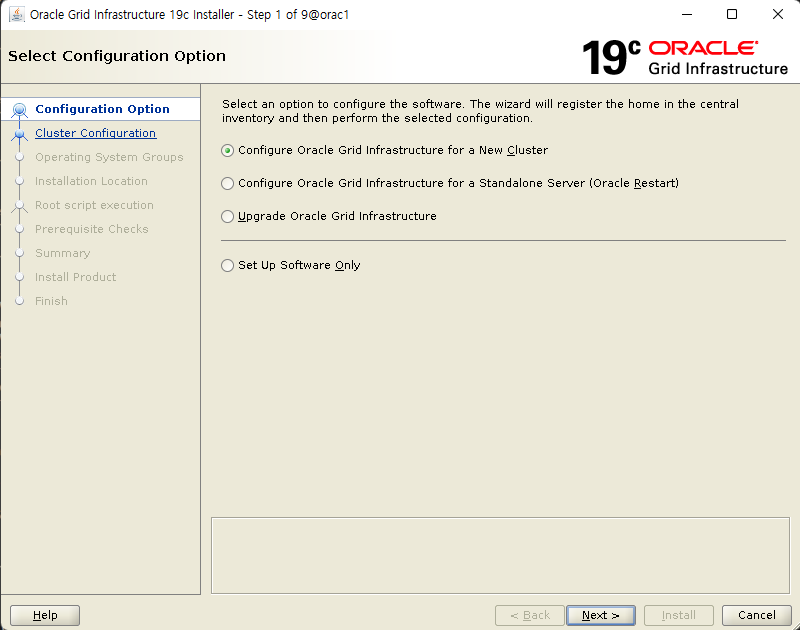
새로운 RAC 클러스터를 구성하기 위해 '새 클러스터에 대한 Oracle Grid Infrastructure 구성'을 선택한 후 <다음> 버튼을 클릭합니다.
▶ Cluster Configuration
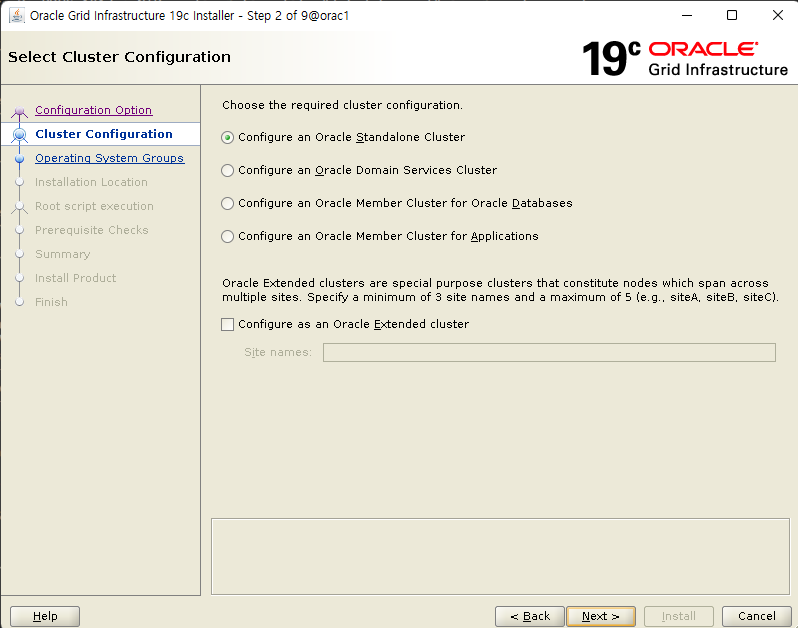
새로운 클러스터를 구성할 것이므로 'Oracle 독립형 클러스터 구성'을 선택하고 <다음> 버튼을 클릭합니다.
▶ Grid Plug and Play

클러스터 이름, SCAN 이름과 SCAN 포트 번호를 입력한 후에 <다음> 버튼을 클릭합니다.
SCAN 이름은 /etc/hosts에 정의한 이름, 그리고 nslookup에서 테스트한 이름과 동일하게 도메인을 포함하여 입력합니다
▶ Cluster Node Information
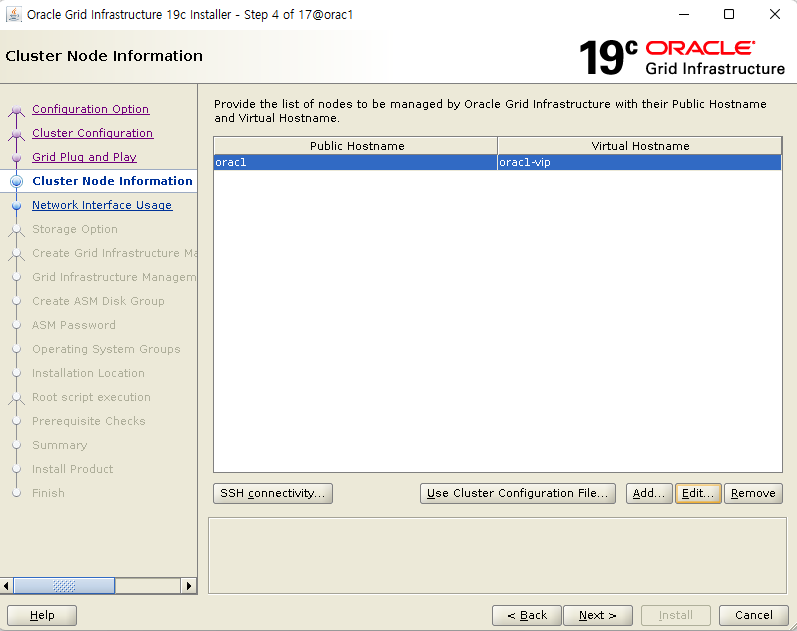
기본적으로 구성 스크립트를 실행한 노드의 정보가 클러스터 노드 목록에 표시됩니다.
다른 노드를 추가하기 위해 <추가> 버튼을 클릭합니다
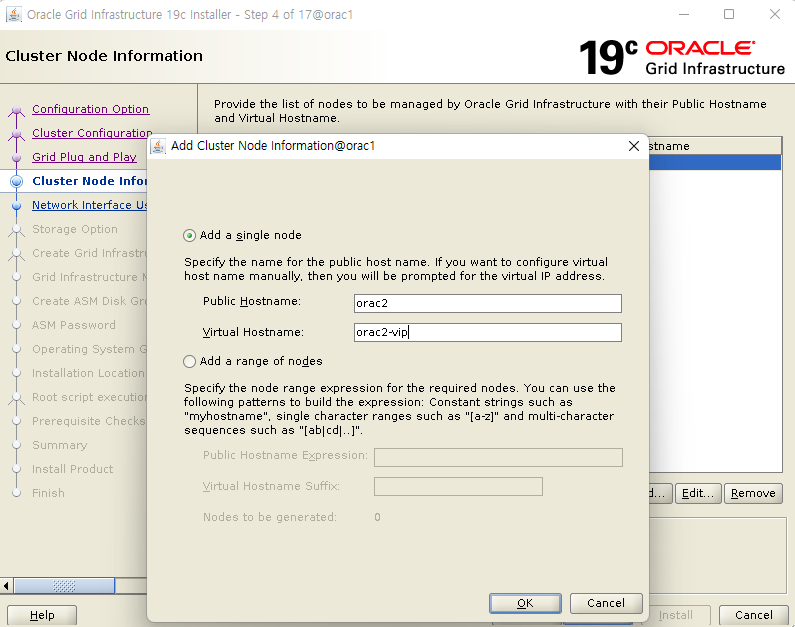
하나의 노드만 추가할 것이므로 '단일 노드 추가'를 선택한 상태에서 추가하려는 노드의 공용 호스트 이름과 가상 호스트 이름을 입력하고 <확인> 버튼을 클릭합니다.
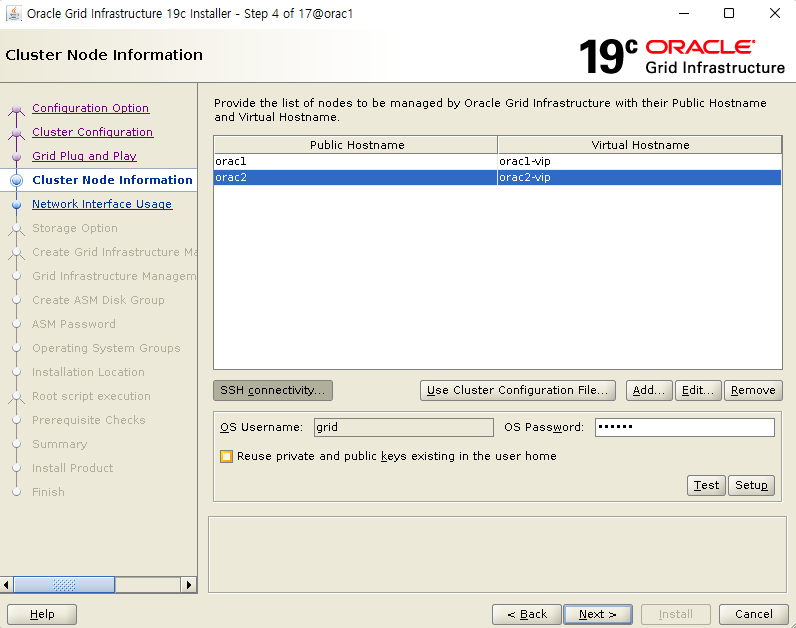
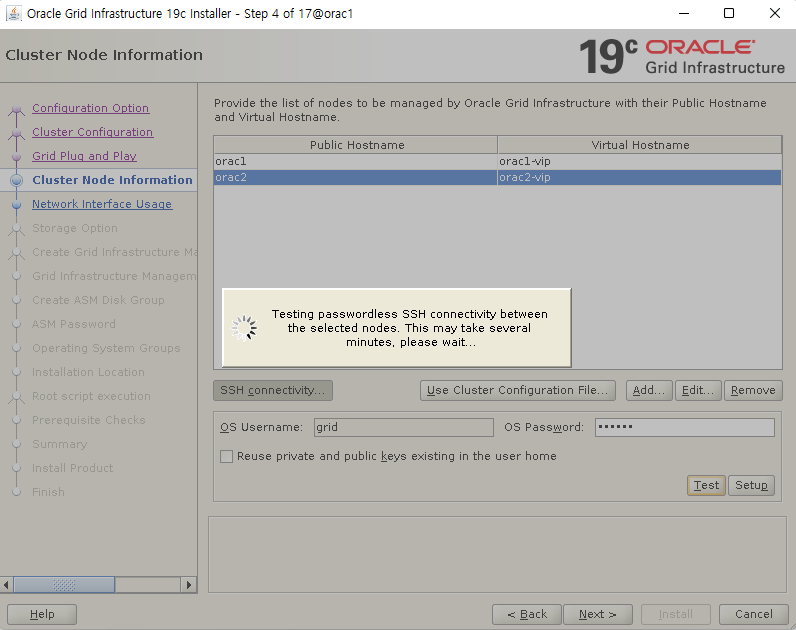
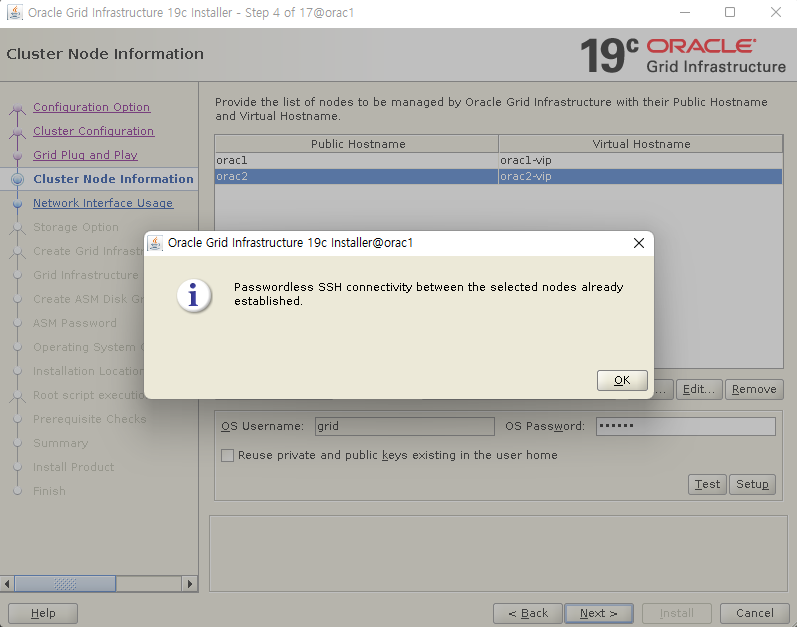
클러스터 노드 간의 비밀번호 없는 SSH 환경 구성을 위해 <SSH 접속> 버튼을 클릭합니다.
사전 검증 스크립트 수행을 위해 oracle 유저에 대한 비밀번호 없는 SSH 환경 구성이 되어 있다면, oracle 유저의 OS 비밀번호를 입력하고 <테스트> 버튼을 클릭합니다.
만약 구성이 되어 있지 않다면, oracle 유저의 OS 비밀번호를 입력하고 <설정> 버튼을 클릭하면 노드간의 비빌번호 없는 SSH 접속 설정이 완료됩니다
▶ Network Interface Usage
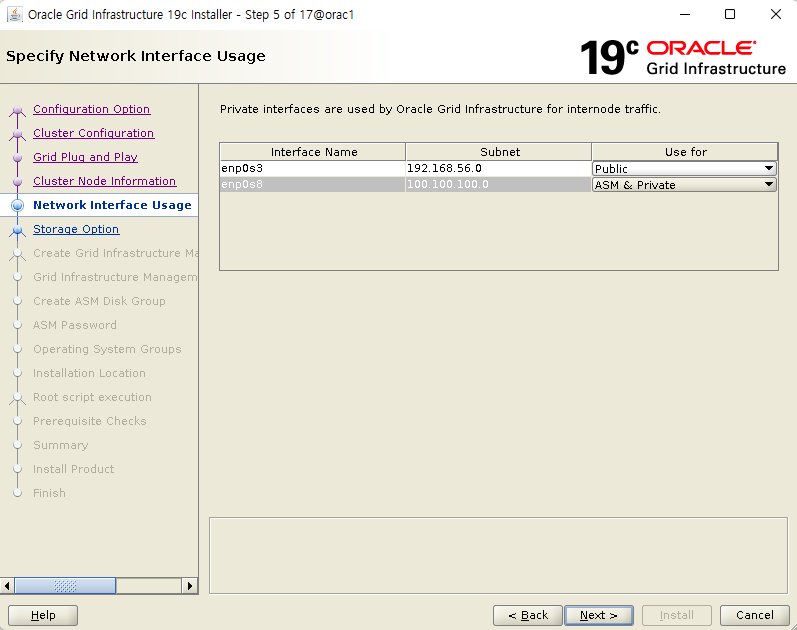
노드간의 네트워크 인터페이스를 확인하는 단계입니다.
공용 인터페이스는 Public IP와 VIP로 외부와 통신하는데 사용되며 ASM 및 전용 인터페이스는 ASM과 RAC 노드간의 통신에만 사용됩니다.
노드간의 인터페이스 이름과 서브넷은 공용, 전용 구분하여 동일하게 설정이 되어야 합니다.
private 를 asm&private 로 변경 후 다음 진행
정상적으로 인식이 되면 <다음> 버튼을 클릭합니다.
※ 만약 같은 공용이나 전용 인터페이스 간의 이름이 다를 경우, 인터페이스 이름이 *로 표시되며 패치나 설치 과정에서 경고나 오류 메시지가 출력됩니다.
따라서 같은 용도의 인터페이스 이름이 일치하도록 네트워크 인터페이스를 구성해야 합니다.
일반적으로 리눅스 7부터는 인터페이스 이름이 자동으로 부여됩니다
▶ Storage Option
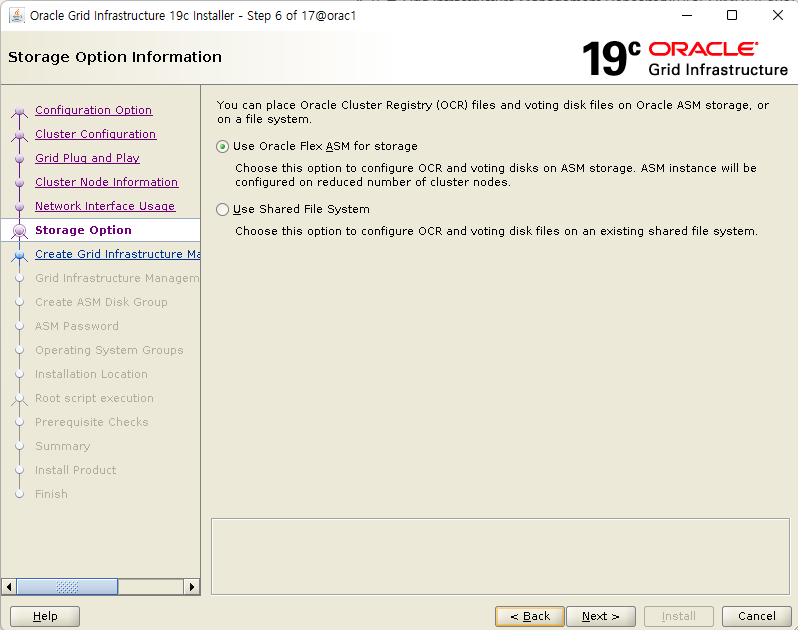
OCR과 Voting disk를 ASM에 구성할 것이므로 '저장 영역에 Oracle Flex ASM 사용'을 선택하고 <다음> 버튼을 클릭합니다.
▶ Create Grid Infrastructure Management Reposit...
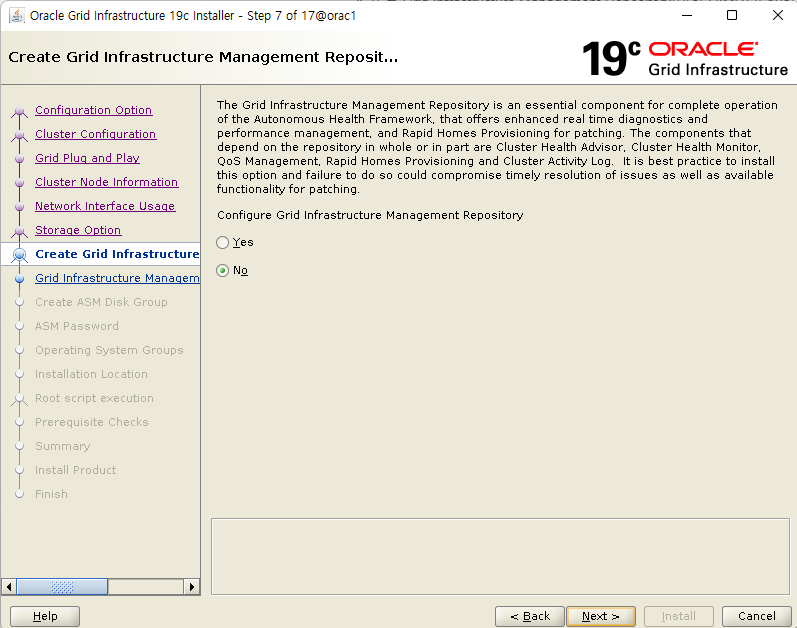
12.1.0.2 이후부터 18c까지 강제적으로 구성되었던 Grid Infrastructure 관리 저장소
또는 Grid Infrastructure Management Repository(이하 GIMR)가 19c부터는 선택적으로 구성할 수 있게 되었습니다.
기본값인 '아니오'를 선택한 후에 <다음> 버튼을 클릭합니다.
▶ Create ASM Disk Group
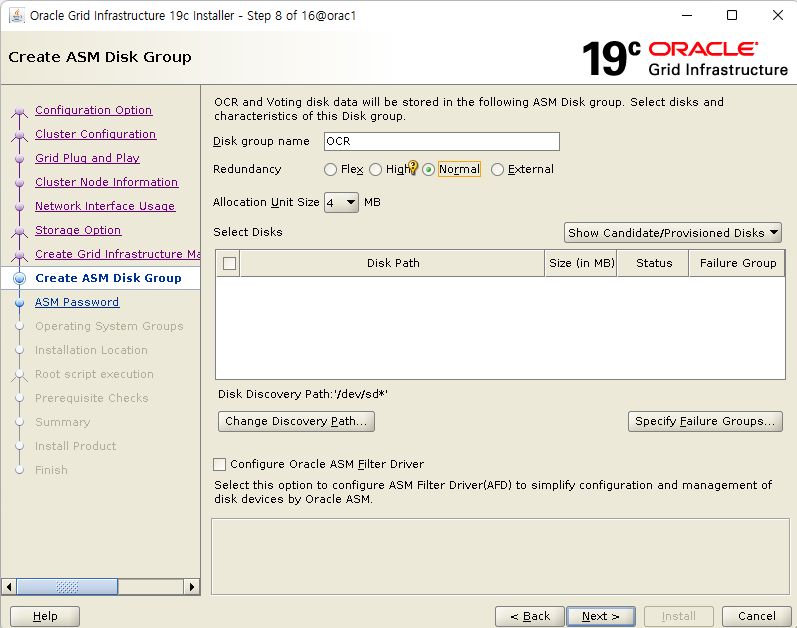
OCR과 Voting을 저장하기 위한 디스크 그룹을 생성합니다.
ASMLib로 등록된 디스크 목록을 검색하기 위해 <검색 경로 변경> 버튼을 클릭합니다.
※ 추가된 DISK 목록이 안나올 경우. DISK 소유권 확인 필요 (grid:dba 로 되어있어야함)

디스크 검색 경로에 "/dev/sd*"를 입력하고 <확인> 버튼을 클릭합니다.
디스크 그룹 이름을 "CRS"로 변경하고, 중복성은 기본값인 '일반'을 유지합니다.
용량이 크지 않은 정보가 저장되는 공간이므로 1GB 디스크 3개를 '일반'으로 구성하면 충분합니다.
운영 시스템에서 '높음' 이상으로 구성할 경우에는 1GB 이상의 디스크 5개 이상을 사용하면 됩니다.
테스트 목적으로 RAC를 구축하거나 수동으로 관리할 계획이라면 '외부' 중복성으로 구성할 수도 있습니다.
검색된 디스크 선택 목록에서 저장할 디스크(sdb, sdc, sdd)를 선택한 후 <다음> 버튼을 클릭합니다.
▶ ASM Password

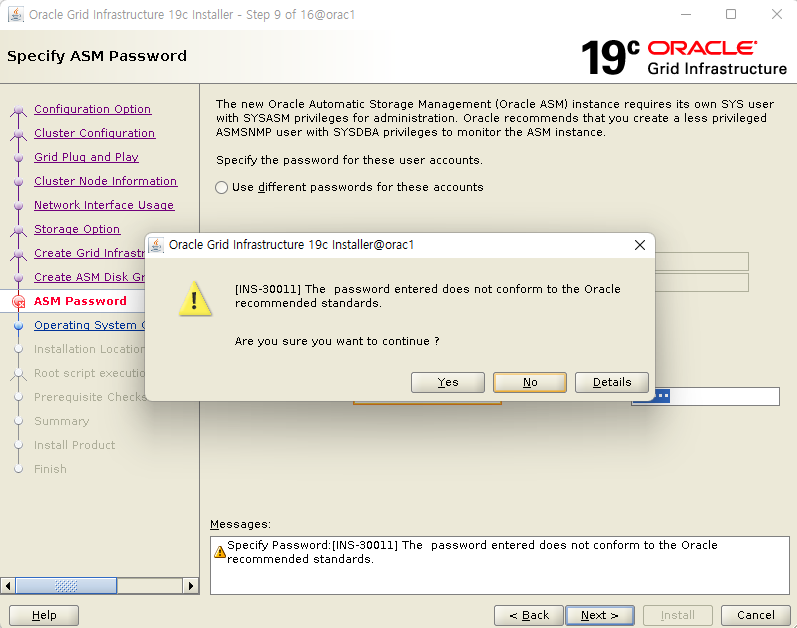
SYSASM 권한 사용자의 비밀번호를 설정하는 단계입니다.
실습을 위해 하나의 패스워드로 SYS와 ASMSNMP 계정의 비밀번호를 사용할 것이므로 '이러한 계정에 동일한 비밀번호 사용'을 선택하고 비밀번호를 입력합니다.
암호 복잡도 규칙에 맞는 비밀번호를 입력한 후 <다음> 버튼을 클릭합니다.
(테스트용 이므로 ‘oracle’ 로 생성:에러메시지 무시)
▶ Failure Isolation

'IPMI를 사용 안함'을 선택하고 <다음> 버튼을 클릭합니다.
▶ Management Options
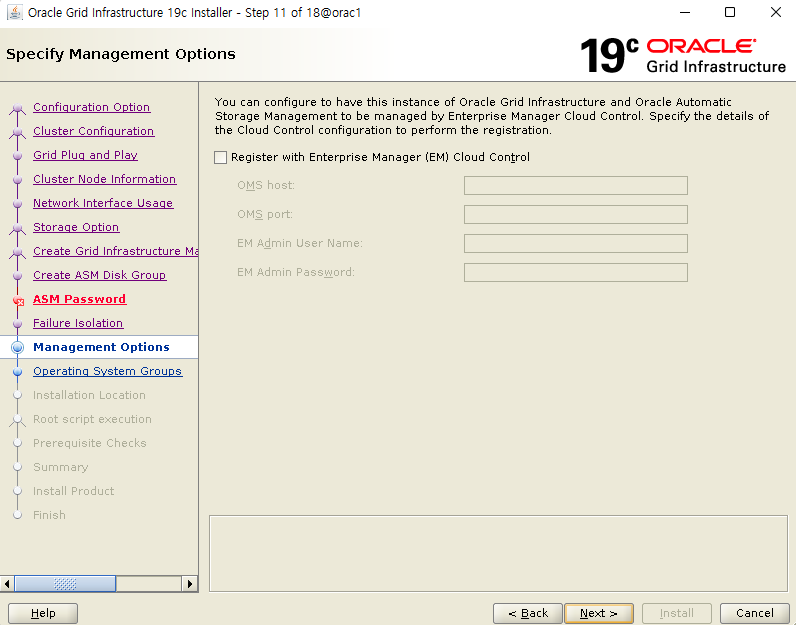
별도의 EM 시스템에 등록하지 않는다면, 'EM(Enterprise Manager) Cloud Control에 등록'이 해제된 상태(기본)에서 <다음> 버튼을 클릭합니다.
▶ Operating System Groups

ASM 권한 관련 OS 인증에 사용할 OS 그룹을 선택하는 단계입니다.
정상적으로 지정되었는지 확인하고 <다음> 버튼을 클릭합니다.
간혹 운영 환경에서는 dba로 통합하여 사용하기도 하지만, 클러스터 구성 검증 수행시 생성된 자동 수정 스크립트(runfixup.sh)에서 asmadmin과 asmdba 그룹을 생성합니다.
※ dba 그룹으로 통합하여 사용 할 예정이므로 dba 선택
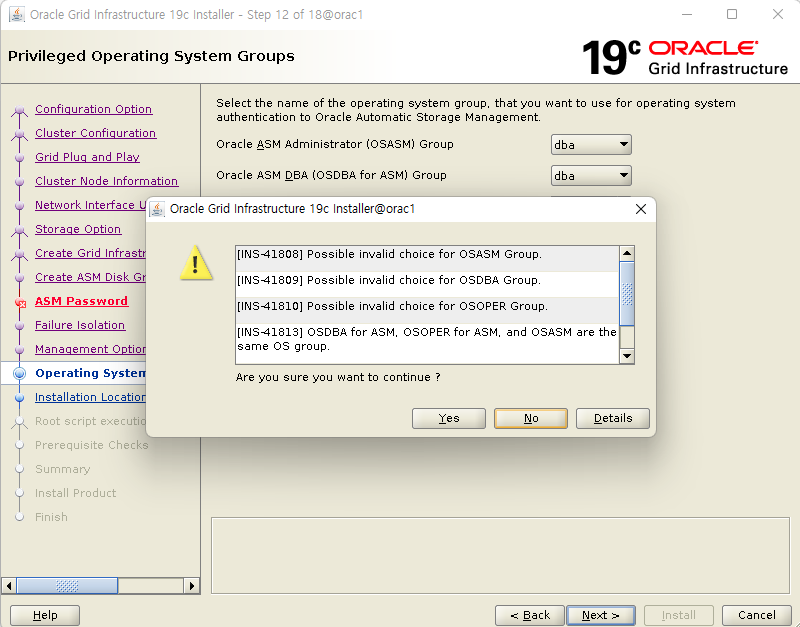
ASM 인스턴스를 위해서는 asmadmin, asmdba, asmoper 등을 만들도록 권고하지만 테스트용으로 dba 하나만 만들었으므로 무시하고 다음 진행
▶ Installation Location
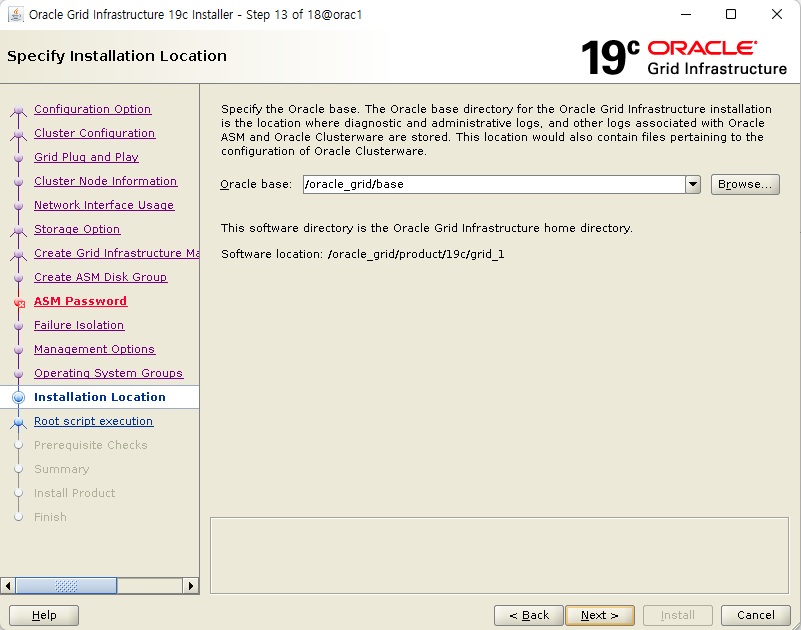
Oracle Base 경로를 확인하는 단계입니다.
정상적으로 지정이 되었으면 <다음> 버튼을 클릭합니다.
▶ Create Inventory
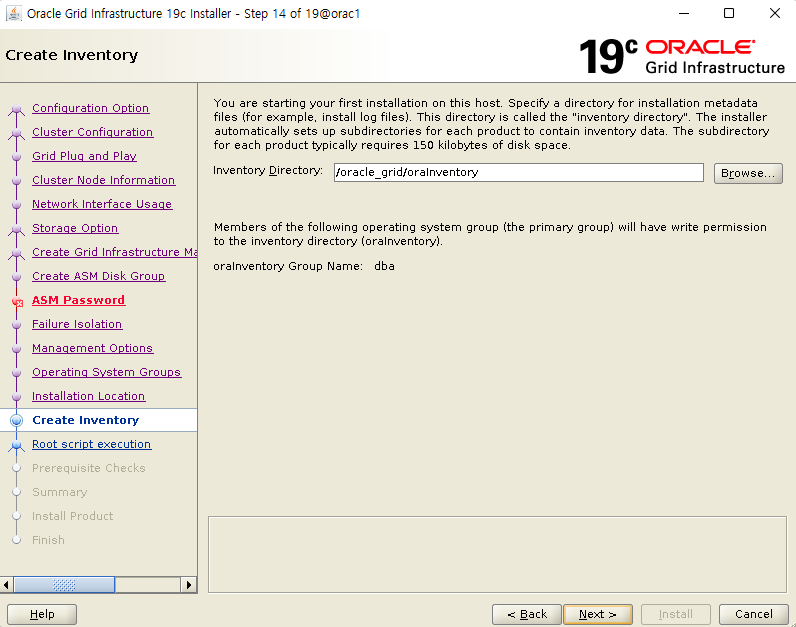
오라클 인벤토리 디렉토리 경로와 인벤토리 그룹을 확인하고 <다음> 버튼을 클릭합니다.
인벤토리에는 오라클 소프트웨어의 설치 정보가 저장됩니다.
가능한 oinstall 그룹을 사용하여 인벤토리를 구성할 것을 권장합니다.
▶ Root script execution

클러스터 구성 과정 중에 root 권한으로 스크립트를 실행하는 과정이 있습니다.
'자동으로 구성 스크립트 실행'을 체크하고 '"루트" 사용자 인증서 사용'을 선택한 후 root 계정의 비밀번호를 입력하고 <다음> 버튼을 클릭합니다.
자동으로 구성 스크립트를 실행하기 위해서는 모든 노드의 root 계정 비밀번호가 동일해야 합니다.
만약 노드간에 root 계정의 암호가 다르거나, 수동으로 설치를 진행하고자 할 경우에는 아무 것도 선택하지 않고 다음 단계로 진행하면 수동으로 스크립트 실행을 할 수 있습니다.
※ 수동으로 진행할 예정이므로 체크 하지 않고 다음진행
▶ Perform Prerequisite Checks
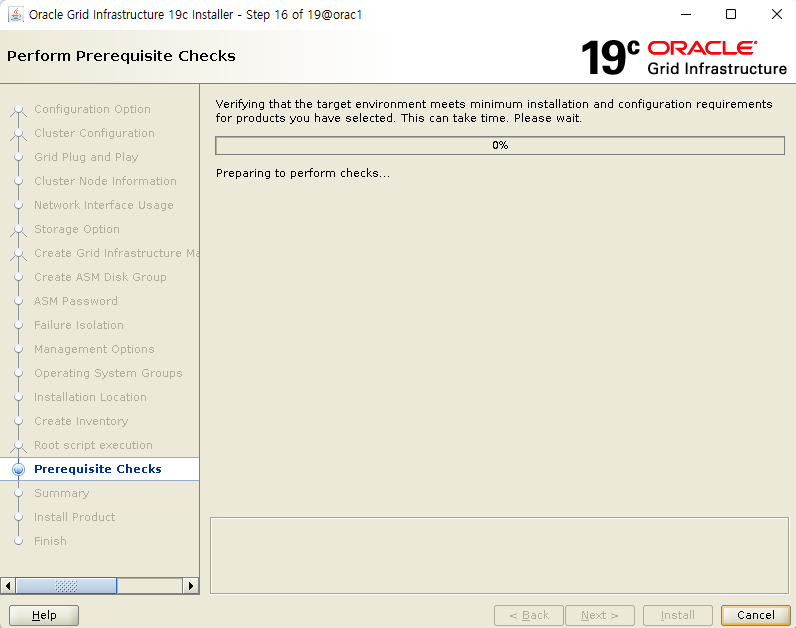
설치에 앞서 서버에 대한 필요 조건 검사가 실행됩니다.
이 단계에서 누락되거나 잘못된 설정을 반드시 수정하고 설치를 진행해야 합니다.
특이사항이 없을 경우에는 자동으로 다음 단계로 넘어갑니다.
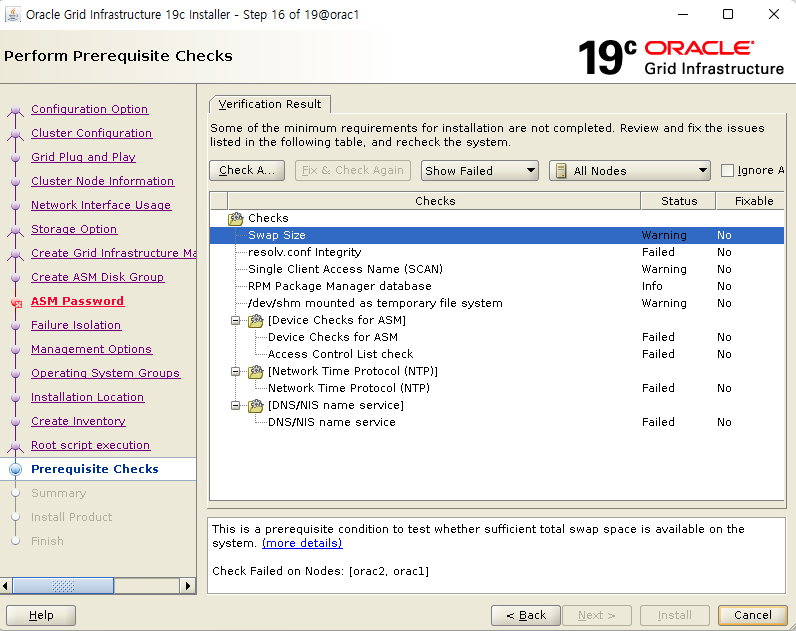
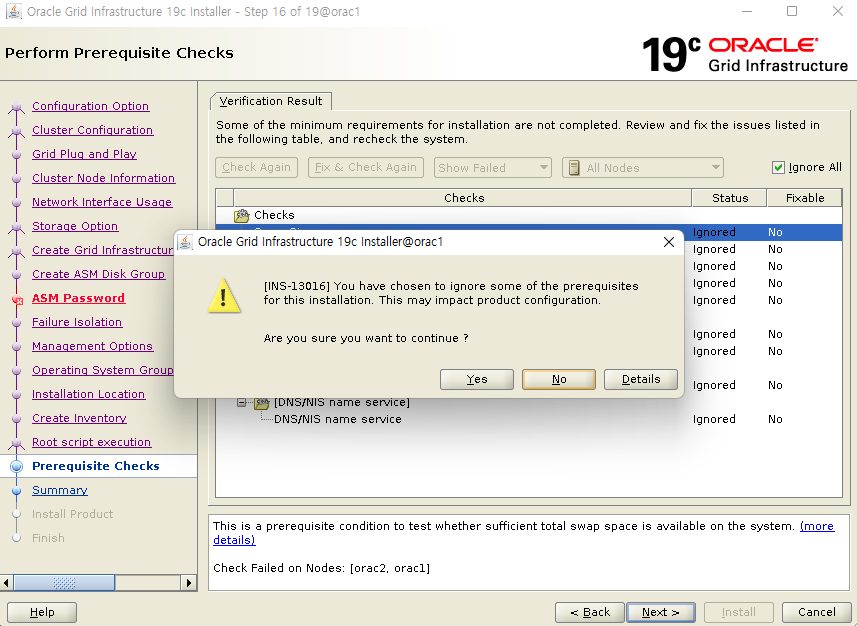
설치에 앞서 서버에 대한 필요 조건 검사가 실행됩니다.
fixable 가능한 조건은 ‘fix&check again’ 으로 진행하고 최대한 모든 조건은 맞춰주고 다음 진행
※ 내용상 설치에 지장없는 내용이므로
'ignore all' 선택후 다음진행
에러창은 정말 무시하고 진행하는지 확인 창
# 불충분 조건 내용 확인

1. swap size
swap size 부족하여 확인하라는 내용
(테스트용이므로 pass 가능)

2. resolv.conf Integrity
dns 가 다음을 수행. 도메인 이름을 ip 주소로 변환
(테스트용이므로 pass 가능)

3. Single Client Access Name (SCAN)
SCAN IP 가 DNS 에 등록되어있지 않아 확인하라는 내용
(hosts 에 설정되어있으므로 pass 가능)

4. RPM Package Manager database
root 권한이 필요하다는 내용
(pass 가능)

5. /dev/shm mounted as temporary file system
/dev/shm 가 마운트되지 않았다는 내용
(pass 가능)
Linux OL7/RHEL7: PRVE-0421 : No entry exists in /etc/fstab for mounting /dev/shm (문서 ID 2065603.1)

6. Device Checks for ASM
Access Control List check
node2 의 파일이 root 로 되어있어 node1과 node2 의 소유자가 일치하지 않아 확인하라는 내용
(node 2 소유자 변경후 해당 내용 없어짐)

7. Network Time Protocol (NTP)
PRVG-1017은 클러스터 시간 동기화를 위한 NTP 서비스 데몬이 실행되고 있지 않음을 의미
(pass 가능)

8. DNS/NIS name service
SCAN IP 주소 구성할때 DNS 서버를 사용하지 않는 경우 발생하는 에러
(pass 가능)
▶ Summary

본격적인 설치에 앞서 구성될 환경에 대한 요약 정보를 검토합니다.
수정할 사항이 있으면 해당 항목 옆에 '편집'을 클릭하여 변경하면 됩니다.
정확하게 모든 사항이 선택되었으면 <설치> 버튼을 클릭합니다.
▶ Install Product
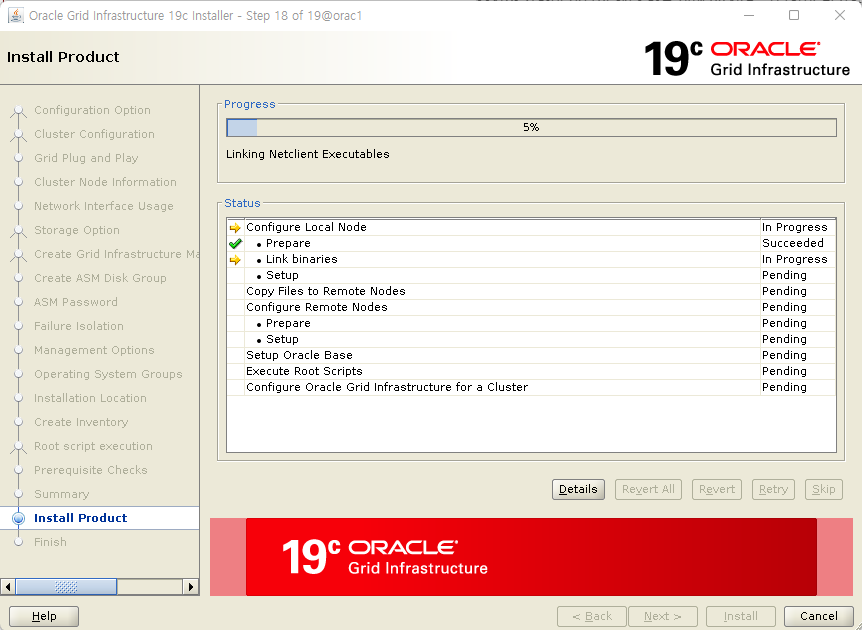
로컬 노드와 원격 노드에 GI 설치가 진행됩니다.
로컬 노드에는 GRID_HOME 디렉토리에 설치 파일의 압축이 이미 풀려 있으므로, 파일 복제 과정은 생략됩니다.
(19c 는 oracle_home 에 직접 압축 해제 진행)

원격 노드에는 Private 망의 SSH 연결을 통해 설치 파일이 전송되며 GRID_HOME 디렉토리에 파일 복제가 진행됩니다
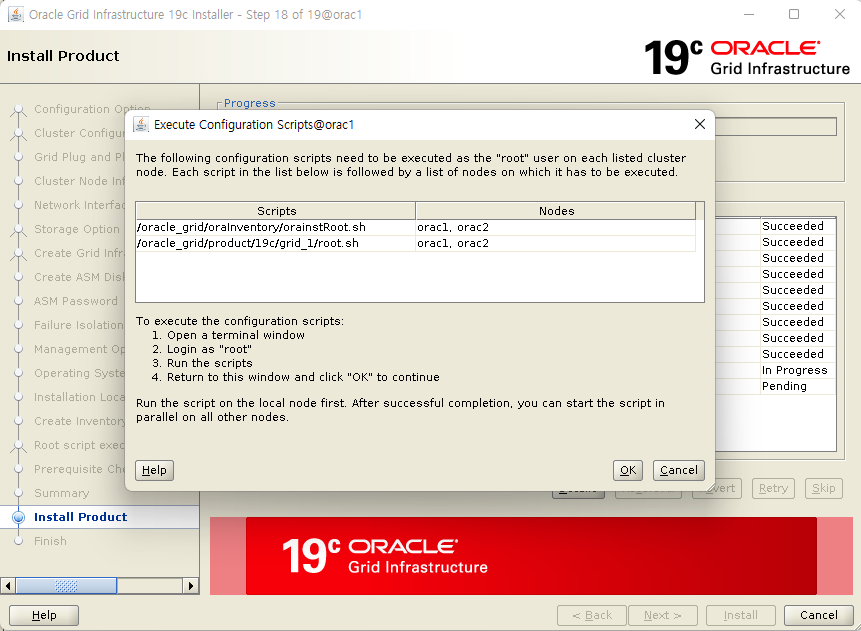
root 계정으로 해당 스크립트 진행
node1 / node2 으로 순차적으로 진행해야함
스크립트 실행 내용 확인
[root@orac1 dev]# /oracle_grid/oraInventory/orainstRoot.sh
Changing permissions of /oracle_grid/oraInventory.
Adding read,write permissions for group.
Removing read,write,execute permissions for world.
Changing groupname of /oracle_grid/oraInventory to dba.
The execution of the script is complete.
[root@orac1 dev]#
---
[root@orac2 dev]# /oracle_grid/oraInventory/orainstRoot.sh
Changing permissions of /oracle_grid/oraInventory.
Adding read,write permissions for group.
Removing read,write,execute permissions for world.
Changing groupname of /oracle_grid/oraInventory to dba.
The execution of the script is complete.
[root@orac2 dev]#
---
[root@orac1 dev]# /oracle_grid/product/19c/grid_1/root.sh
Performing root user operation.
The following environment variables are set as:
ORACLE_OWNER= grid
ORACLE_HOME= /oracle_grid/product/19c/grid_1
Enter the full pathname of the local bin directory: [/usr/local/bin]:
Copying dbhome to /usr/local/bin ...
Copying oraenv to /usr/local/bin ...
Copying coraenv to /usr/local/bin ...
Creating /etc/oratab file...
Entries will be added to the /etc/oratab file as needed by
Database Configuration Assistant when a database is created
Finished running generic part of root script.
Now product-specific root actions will be performed.
Relinking oracle with rac_on option
Using configuration parameter file: /oracle_grid/product/19c/grid_1/crs/install/crsconfig_params
The log of current session can be found at:
/oracle_grid/base/crsdata/orac1/crsconfig/rootcrs_orac1_2023-01-06_02-05-46PM.log
2023/01/06 14:06:04 CLSRSC-594: Executing installation step 1 of 19: 'SetupTFA'.
2023/01/06 14:06:04 CLSRSC-594: Executing installation step 2 of 19: 'ValidateEnv'.
2023/01/06 14:06:04 CLSRSC-363: User ignored prerequisites during installation
2023/01/06 14:06:04 CLSRSC-594: Executing installation step 3 of 19: 'CheckFirstNode'.
2023/01/06 14:06:06 CLSRSC-594: Executing installation step 4 of 19: 'GenSiteGUIDs'.
2023/01/06 14:06:08 CLSRSC-594: Executing installation step 5 of 19: 'SetupOSD'.
2023/01/06 14:06:08 CLSRSC-594: Executing installation step 6 of 19: 'CheckCRSConfig'.
2023/01/06 14:06:08 CLSRSC-594: Executing installation step 7 of 19: 'SetupLocalGPNP'.
2023/01/06 14:06:28 CLSRSC-594: Executing installation step 8 of 19: 'CreateRootCert'.
2023/01/06 14:06:33 CLSRSC-594: Executing installation step 9 of 19: 'ConfigOLR'.
2023/01/06 14:06:43 CLSRSC-4002: Successfully installed Oracle Trace File Analyzer (TFA) Collector.
2023/01/06 14:06:50 CLSRSC-594: Executing installation step 10 of 19: 'ConfigCHMOS'.
2023/01/06 14:06:50 CLSRSC-594: Executing installation step 11 of 19: 'CreateOHASD'.
2023/01/06 14:06:55 CLSRSC-594: Executing installation step 12 of 19: 'ConfigOHASD'.
2023/01/06 14:06:56 CLSRSC-330: Adding Clusterware entries to file 'oracle-ohasd.service'
2023/01/06 14:07:38 CLSRSC-594: Executing installation step 13 of 19: 'InstallAFD'.
2023/01/06 14:07:44 CLSRSC-594: Executing installation step 14 of 19: 'InstallACFS'.
2023/01/06 14:08:28 CLSRSC-594: Executing installation step 15 of 19: 'InstallKA'.
2023/01/06 14:08:35 CLSRSC-594: Executing installation step 16 of 19: 'InitConfig'.
ASM이 성공적으로 생성되고 시작되었습니다.
[DBT-30001] 디스크 그룹이 성공적으로 생성되었습니다. 자세한 내용은 /oracle_grid/base/cfgtoollogs/asmca/asmca-230106오후020908.log을(를) 확인하십시오.
2023/01/06 14:10:32 CLSRSC-482: Running command: '/oracle_grid/product/19c/grid_1/bin/ocrconfig -upgrade grid dba'
CRS-4256: Updating the profile
Successful addition of voting disk 8749b2400b6c4f0bbfd80caa3e20c2fa.
Successful addition of voting disk ab5354f87a9b4ffdbf0bf3b671ccfc76.
Successful addition of voting disk ce52f4f286c94fccbf3fbd2eb9626c94.
Successfully replaced voting disk group with +CRS.
CRS-4256: Updating the profile
CRS-4266: Voting file(s) successfully replaced
## STATE File Universal Id File Name Disk group
-- ----- ----------------- --------- ---------
1. ONLINE 8749b2400b6c4f0bbfd80caa3e20c2fa (/dev/sdb) [CRS]
2. ONLINE ab5354f87a9b4ffdbf0bf3b671ccfc76 (/dev/sdc) [CRS]
3. ONLINE ce52f4f286c94fccbf3fbd2eb9626c94 (/dev/sdd) [CRS]
Located 3 voting disk(s).
2023/01/06 14:12:19 CLSRSC-594: Executing installation step 17 of 19: 'StartCluster'.
2023/01/06 14:13:40 CLSRSC-343: Successfully started Oracle Clusterware stack
2023/01/06 14:13:40 CLSRSC-594: Executing installation step 18 of 19: 'ConfigNode'.
2023/01/06 14:15:13 CLSRSC-594: Executing installation step 19 of 19: 'PostConfig'.
2023/01/06 14:15:41 CLSRSC-325: Configure Oracle Grid Infrastructure for a Cluster ... succeeded
[root@orac1 dev]#
---
[root@orac2 dev]# /oracle_grid/product/19c/grid_1/root.sh
Performing root user operation.
The following environment variables are set as:
ORACLE_OWNER= grid
ORACLE_HOME= /oracle_grid/product/19c/grid_1
Enter the full pathname of the local bin directory: [/usr/local/bin]:
Copying dbhome to /usr/local/bin ...
Copying oraenv to /usr/local/bin ...
Copying coraenv to /usr/local/bin ...
Creating /etc/oratab file...
Entries will be added to the /etc/oratab file as needed by
Database Configuration Assistant when a database is created
Finished running generic part of root script.
Now product-specific root actions will be performed.
Relinking oracle with rac_on option
Using configuration parameter file: /oracle_grid/product/19c/grid_1/crs/install/crsconfig_params
The log of current session can be found at:
/oracle_grid/base/crsdata/orac2/crsconfig/rootcrs_orac2_2023-01-06_02-16-35PM.log
2023/01/06 14:16:55 CLSRSC-594: Executing installation step 1 of 19: 'SetupTFA'.
2023/01/06 14:16:55 CLSRSC-594: Executing installation step 2 of 19: 'ValidateEnv'.
2023/01/06 14:16:55 CLSRSC-363: User ignored prerequisites during installation
2023/01/06 14:16:56 CLSRSC-594: Executing installation step 3 of 19: 'CheckFirstNode'.
2023/01/06 14:16:57 CLSRSC-594: Executing installation step 4 of 19: 'GenSiteGUIDs'.
2023/01/06 14:16:57 CLSRSC-594: Executing installation step 5 of 19: 'SetupOSD'.
2023/01/06 14:16:57 CLSRSC-594: Executing installation step 6 of 19: 'CheckCRSConfig'.
2023/01/06 14:17:00 CLSRSC-594: Executing installation step 7 of 19: 'SetupLocalGPNP'.
2023/01/06 14:17:01 CLSRSC-594: Executing installation step 8 of 19: 'CreateRootCert'.
2023/01/06 14:17:01 CLSRSC-594: Executing installation step 9 of 19: 'ConfigOLR'.
2023/01/06 14:17:12 CLSRSC-594: Executing installation step 10 of 19: 'ConfigCHMOS'.
2023/01/06 14:17:12 CLSRSC-594: Executing installation step 11 of 19: 'CreateOHASD'.
2023/01/06 14:17:14 CLSRSC-594: Executing installation step 12 of 19: 'ConfigOHASD'.
2023/01/06 14:17:14 CLSRSC-330: Adding Clusterware entries to file 'oracle-ohasd.service'
2023/01/06 14:17:33 CLSRSC-4002: Successfully installed Oracle Trace File Analyzer (TFA) Collector.
2023/01/06 14:18:11 CLSRSC-594: Executing installation step 13 of 19: 'InstallAFD'.
2023/01/06 14:18:13 CLSRSC-594: Executing installation step 14 of 19: 'InstallACFS'.
2023/01/06 14:19:17 CLSRSC-594: Executing installation step 15 of 19: 'InstallKA'.
2023/01/06 14:19:19 CLSRSC-594: Executing installation step 16 of 19: 'InitConfig'.
2023/01/06 14:19:34 CLSRSC-594: Executing installation step 17 of 19: 'StartCluster'.
2023/01/06 14:20:33 CLSRSC-343: Successfully started Oracle Clusterware stack
2023/01/06 14:20:33 CLSRSC-594: Executing installation step 18 of 19: 'ConfigNode'.
2023/01/06 14:20:50 CLSRSC-594: Executing installation step 19 of 19: 'PostConfig'.
2023/01/06 14:20:58 CLSRSC-325: Configure Oracle Grid Infrastructure for a Cluster ... succeeded
[root@orac2 dev]#
※ [INS-20802] Oracle Cluster Verification Utility failed. 에러 발생 및 조치
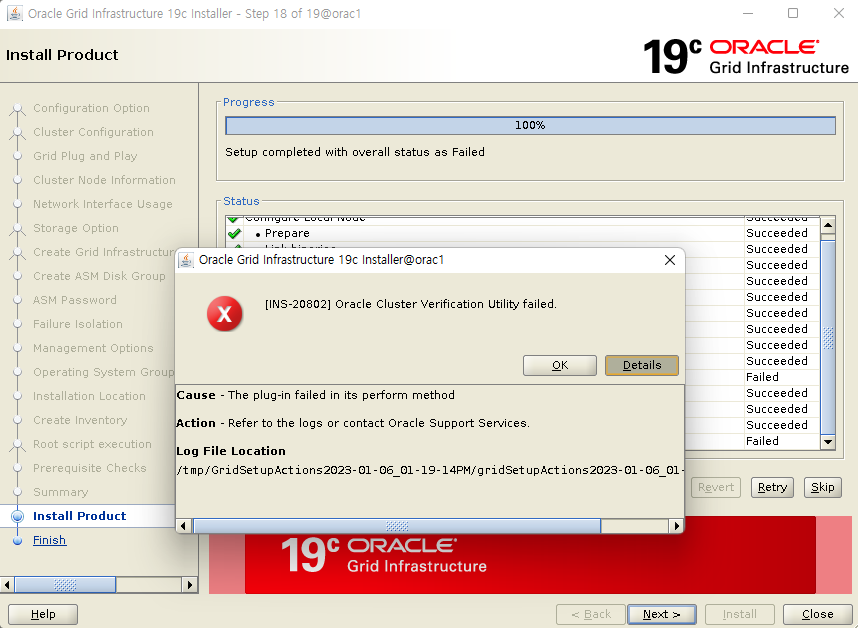
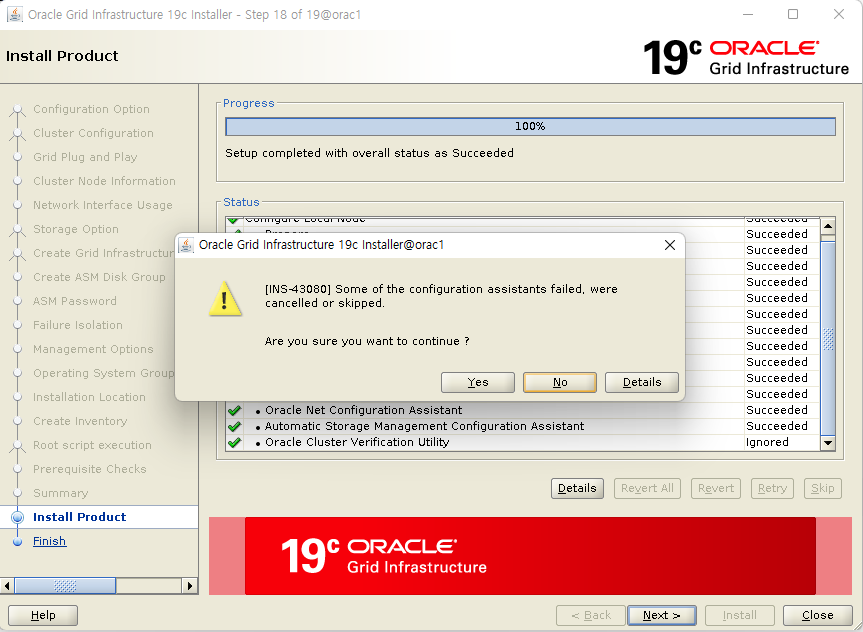
SCAN IP가 DNS에 등록되어 있지 않아서 발생한 문제
그리고 로그상에 "A SCAN is recommended to resolve to "3" or more IP" 라고 표시됨
SCAN IP를 권장하는 값인 3개 이상을 사용하지 않고 1개만 사용해서 발생한 메세지
테스트 DB이므로 DNS에 등록 할 수 없고 문제가 되지 않기 때문에 무시하고 ‘Skip’ 로 다음 진행
(정말 무시할껀지 한번더 확인하는 창 나옴)
에러 내용 확인
INFO: [Jan 6, 2023 2:43:02 PM] Checks did not pass for the following nodes:
INFO: [Jan 6, 2023 2:43:02 PM] orac2,orac1
INFO: [Jan 6, 2023 2:43:02 PM] Failures were encountered during execution of CVU verification request "stage -post crsinst".
INFO: [Jan 6, 2023 2:43:02 PM] Verifying Single Client Access Name (SCAN) ...FAILED
INFO: [Jan 6, 2023 2:43:02 PM] orac2: PRVG-11368 : A SCAN is recommended to resolve to "3" or more IP
INFO: [Jan 6, 2023 2:43:02 PM] addresses, but SCAN "orac-scan" resolves to only "/192.168.56.200"
INFO: [Jan 6, 2023 2:43:02 PM] orac1: PRVG-11368 : A SCAN is recommended to resolve to "3" or more IP
INFO: [Jan 6, 2023 2:43:02 PM] addresses, but SCAN "orac-scan" resolves to only "/192.168.56.200"
INFO: [Jan 6, 2023 2:43:02 PM] Verifying DNS/NIS name service 'orac-scan' ...FAILED
INFO: [Jan 6, 2023 2:43:02 PM] PRVG-11826 : DNS resolved IP addresses "" for SCAN name "orac-scan" not found
INFO: [Jan 6, 2023 2:43:02 PM] in the name service returned IP addresses "192.168.56.200"
INFO: [Jan 6, 2023 2:43:02 PM] PRVG-11827 : Name service returned IP addresses "192.168.56.200" for SCAN
INFO: [Jan 6, 2023 2:43:02 PM] name "orac-scan" not found in the DNS returned IP addresses ""
INFO: [Jan 6, 2023 2:43:02 PM] orac2: PRVF-4664 : Found inconsistent name resolution entries for SCAN name
INFO: [Jan 6, 2023 2:43:02 PM] "orac-scan"
INFO: [Jan 6, 2023 2:43:02 PM] orac1: PRVF-4664 : Found inconsistent name resolution entries for SCAN name
INFO: [Jan 6, 2023 2:43:02 PM] "orac-scan"
INFO: [Jan 6, 2023 2:43:02 PM] Verifying Clock Synchronization ...FAILED
INFO: [Jan 6, 2023 2:43:02 PM] Verifying Network Time Protocol (NTP) ...FAILED
INFO: [Jan 6, 2023 2:43:02 PM] orac2: PRVG-1017 : NTP configuration file "/etc/ntp.conf" is present on nodes
INFO: [Jan 6, 2023 2:43:02 PM] "orac2,orac1" on which NTP daemon or service was not running
INFO: [Jan 6, 2023 2:43:02 PM] orac1: PRVG-1017 : NTP configuration file "/etc/ntp.conf" is present on nodes
INFO: [Jan 6, 2023 2:43:02 PM] "orac2,orac1" on which NTP daemon or service was not running
INFO: [Jan 6, 2023 2:43:02 PM] Verifying '/var/run/ntpd.pid' ...WARNING
INFO: [Jan 6, 2023 2:43:02 PM] PRVG-1019 : The NTP configuration file "/var/run/ntpd.pid" does not exist
INFO: [Jan 6, 2023 2:43:02 PM] on nodes "orac2,orac1"
INFO: [Jan 6, 2023 2:43:02 PM] Verifying '/var/run/chronyd.pid' ...WARNING
INFO: [Jan 6, 2023 2:43:02 PM] PRVG-1019 : The NTP configuration file "/var/run/chronyd.pid" does not
INFO: [Jan 6, 2023 2:43:02 PM] exist on nodes "orac2,orac1"
INFO: [Jan 6, 2023 2:43:02 PM] Verifying Daemon 'ntpd' ...FAILED
INFO: [Jan 6, 2023 2:43:02 PM] PRVG-1024 : The NTP daemon or Service was not running on any of the cluster
INFO: [Jan 6, 2023 2:43:02 PM] nodes.
INFO: [Jan 6, 2023 2:43:02 PM] orac2: PRVF-7590 : "ntpd" is not running on node "orac2"
INFO: [Jan 6, 2023 2:43:02 PM] orac2: Liveness check failed for "ntpd"
INFO: [Jan 6, 2023 2:43:02 PM] orac1: PRVF-7590 : "ntpd" is not running on node "orac1"
INFO: [Jan 6, 2023 2:43:02 PM] orac1: Liveness check failed for "ntpd"
INFO: [Jan 6, 2023 2:43:02 PM] Verifying Daemon 'chronyd' ...FAILED
INFO: [Jan 6, 2023 2:43:02 PM] PRVG-1024 : The NTP daemon or Service was not running on any of the cluster
INFO: [Jan 6, 2023 2:43:02 PM] nodes.
INFO: [Jan 6, 2023 2:43:02 PM] orac2: PRVF-7590 : "chronyd" is not running on node "orac2"
INFO: [Jan 6, 2023 2:43:02 PM] orac2: Liveness check failed for "chronyd"
INFO: [Jan 6, 2023 2:43:02 PM] orac1: PRVF-7590 : "chronyd" is not running on node "orac1"
INFO: [Jan 6, 2023 2:43:02 PM] orac1: Liveness check failed for "chronyd"
INFO: [Jan 6, 2023 2:43:02 PM] CVU operation performed: stage -post crsinst
INFO: [Jan 6, 2023 2:43:02 PM] Date: Jan 6, 2023 2:42:01 PM
INFO: [Jan 6, 2023 2:43:02 PM] CVU home: /oracle_grid/product/19c/grid_1/
INFO: [Jan 6, 2023 2:43:02 PM] User: grid
INFO: [Jan 6, 2023 2:43:02 PM] Completed Plugin named: cvu
INFO: [Jan 6, 2023 2:43:02 PM] Setup completed with overall status as Failed
▶ Finish

GI 설치와 구성이 완료되면 <닫기> 버튼을 클릭하여 설치 프로그램을 종료합니다.
GRID 설치 완료 후 확인
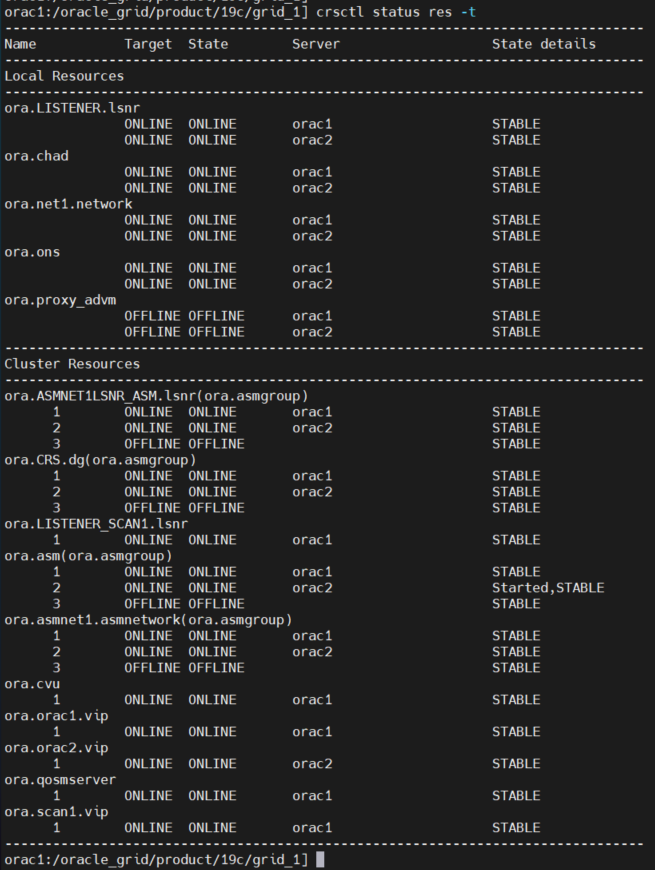
설치 결과 확인
. crsctl stat res -t 명령을 통해 정상적으로 클러스터가 구성되었는지 확인
$ crsctl stat res -t
'Oracle > Install & Patch' 카테고리의 다른 글
| [RHEL 7.9] ORACLE_19c_Install_RAC (3) Oracle Instance 설치 (0) | 2023.05.24 |
|---|---|
| [RHEL 7.9] ORACLE_19c_Install_RAC (2) ASM 구성 및 Oracle 엔진 설치 (0) | 2023.05.23 |
| Oracle Patch 적용 확인 스크립트 (0) | 2023.05.23 |
| [RHEL 7.9] ORACLE_19c(19.3.0.0)_Install_Silent Mode (0) | 2023.05.19 |
| [RHEL 7.9] ORACLE_11g(11.2.0.4)_Install (1) | 2023.05.18 |


댓글