개요
실제 업무상 UI 를 띄우지 못해 설치를 진행하지 못하는 경우는 거의 없습니다.
다만 그러한 경우도 발생할 때를 대비하여 CLI (Command-line interface) 상에서 설치하는 내용을 작성합니다.
작업시간
(작업 환경에 따라 소요시간은 크게 달라질 수 있습니다.)
| oracle software 설치 | 40분 |
| netca (리스너 구성) | 3분 |
| dbca (db 생성) | 25분 |
dba 그룹 및 오라클 계정 확인
[root@ora11g media]# cat /etc/group |grep dba
dba:x:1001:
[root@ora11g media]# cat /etc/passwd |grep 1001
oracle:x:1001:1001::/home/oracle:/bin/bash
/etc/sysctl.conf 파일 편집
fs.file-max = 6815744
kernel.shmmax = 2147483648  => ORACLE 인스턴스의 SGA 크기보다 크게 설정 할것을 권고
kernel.shmall = 536870912
kernel.sem = 250 32000 100 128
net.ipv4.ip_local_port_range = 32768 65000
net.core.rmem_default=262144
net.core.rmem_max=4194304
net.core.wmem_default=262144
net.core.wmem_max=1048576


shell> sysctl -p    => 커널 변경값 적용
.bash_profile 내용 작성
경로, sid, nls_lang 등 의 내용을 본인이 설치하고자 하는 환경에 맞추어 작성하시면 됩니다.
# .bash_profile

# Get the aliases and functions

if [ -f ~/.bashrc ]; then
. ~/.bashrc
fi

# User specific environment and startup programs

PATH=$PATH:$HOME/.local/bin:$HOME/bin

export PATH

export ORACLE_BASE=/oracle/app
export ORACLE_HOME=$ORACLE_BASE/product/193/db_1
export ORACLE_PATH=$ORACLE_BASE/common/oracle/sql:.:$ORACLE_HOME/rdbms/admin

export ORACLE_SID=testdb
export NLS_LANG=AMERICAN_AMERICA.KO16MSWIN949

export PATH=.:${PATH}:$HOME/bin:$ORACLE_HOME/bin:$ORA_CRS_HOME/bin
export PATH=${PATH}:/usr/bin:/bin:/usr/bin/X11:/usr/local/bin
export PATH=${PATH}:$ORACLE_BASE/common/oracle/bin:/oracle/cmd:${ORACLE_HOME}/OPatch
export ORACLE_TERM=xterm
export TNS_ADMIN=$ORACLE_HOME/network/admin
export ORA_NLS10=$ORACLE_HOME/nls/data
export LD_LIBRARY_PATH=$ORACLE_HOME/lib
export LD_LIBRARY_PATH=${LD_LIBRARY_PATH}:$ORACLE_HOME/oracm/lib
export LD_LIBRARY_PATH=${LD_LIBRARY_PATH}:/lib:/usr/lib:/usr/local/lib
export CLASSPATH=$ORACLE_HOME/JRE
export CLASSPATH=${CLASSPATH}:$ORACLE_HOME/jlib
export CLASSPATH=${CLASSPATH}:$ORACLE_HOME/rdbms/jlib
export CLASSPATH=${CLASSPATH}:$ORACLE_HOME/network/jlib
export THREADS_FLAG=native
export TEMP=/tmp
export TMPDIR=/tmp
export LANG=C
umask 022
PS1=`hostname`:'$PWD] '
export EDITOR=vi
export DISPLAY=192.168.56.1:0.0
$ORACLE_HOME / $ORACLE_BASE 경로 디렉토리 생성 확인 (+oraInventory)
ora11g:/home/oracle] cd $ORACLE_HOME
-bash: cd: /oracle/app/product/193/db_1: No such file or directory
ora11g:/home/oracle] cd $ORACLE_BASE
-bash: cd: /oracle/app: No such file or directory
ora11g:/home/oracle] mkdir -p $ORACLE_BASE
ora11g:/home/oracle] mkdir -p $ORACLE_HOME
ora11g:/home/oracle] cd $ORACLE_HOME
ora11g:/oracle/app/product/193/db_1] cd $ORACLE_BASE
ora11g:/oracle/app] mkdir oraInventory

ora11g:/oracle/app] ls -al
total 0
drwxr-xr-x. 4 oracle dba 37 Mar  3 13:30 .
drwxr-xr-x. 4 oracle dba 30 Mar  3 13:14 ..
drwxr-xr-x. 3 oracle dba 21 Mar  3 13:15 app
drwxr-xr-x. 2 oracle dba  6 Mar  3 13:30 oraInventory
ora11g:/oracle/app]
※ hostname 바꾸기
root 계정으로 ‘hostnamectl set-hostname [호스트네임명]’ 명령어 입력

[root@ora11g network-scripts]# hostnamectl set-hostname ora19c
[root@ora11g network-scripts]# hostname
ora19c
설치 진행 순서
- 소프트웨어 설치
- 리스너 구성
- 데이터베이스 생성
response 파일 위치
| 디렉토리 | 파일명 | 용도 |
| $ORACLE_HOME/install/response | db_install.rsp | 소프트웨어 설치 |
| $ORACLE_HOME/assistants/dbca | dbca.rsp | 데이터베이스 설치 |
| $ORACLE_HOME/assistants/netca | netca.rsp | 리스너 생성 |
1. 소프트웨어 설치
1.1 설치 파일 압축해제 (home 스타일)
ora19c:/oracle/media] ls -al
total 4566416
drwxr-xr-x. 2 oracle dba         123 Mar  3 13:09 .
drwxr-xr-x. 4 oracle dba          30 Mar  3 13:14 ..
-rw-r--r--. 1 root   root 3059705302 Mar  3 13:08 LINUX.X64_193000_db_home.zip
-rw-r--r--. 1 root   root 1495300727 Mar  3 13:09 p32218454_190000_Linux-x86-64.zip
-rw-r--r--. 1 root   root  120998448 Mar  3 13:09 p6880880_190000_Linux-x86-64.zip
ora19c:/oracle/media]
ora19c:/oracle/media] unzip LINUX.X64_193000_db_home.zip -d $ORACLE_HOME
…
1.2 db_install.rsp 수정
vi $ORACLE_HOME/install/response/db_install.rsp

oracle.install.option=INSTALL_DB_SWONLY
  => 다음 중 하나 선택 가능 : INSTALL_DB_SWONLY, INSTALL_DB_AND_CONFIG
UNIX_GROUP_NAME=dba
  => 인벤토리 디렉토리의 UNIX 그룹 선택
INVENTORY_LOCATION=/oracle/app/oraInventory
  => 인벤토리 디렉토리 위치 선택
ORACLE_HOME=/oracle/app/product/193/db_1
  => ORACLE_HOME 위치
ORACLE_BASE=/oracle/app
  => ORACLE_BASE 위치
oracle.install.db.InstallEdition=EE
  => 데이타베이스 설치 버전 선택, EE :Enterprise Edition, SE2 : Standard Edition 2
oracle.install.db.OSDBA_GROUP=dba
  => 데이타베이스 관리자 그룹
oracle.install.db.OSOPER_GROUP=dba
  => 선택사항, 데이터베이스 운영자(OSOPER) 그룹
oracle.install.db.OSBACKUPDBA_GROUP=dba
  => 데이터베이스 백업 및 복구(OSBACKUPDBA) 그룹
oracle.install.db.OSDGDBA_GROUP=dba
  => Dtata Guard관리(OSDGDBA) 그룹
oracle.install.db.OSKMDBA_GROUP=dba
  => 암호화키 관리(OSKMDBA)
oracle.install.db.OSRACDBA_GROUP=dba
  => Real Application Cluster 관리(OSRACDBA) 그룹
oracle.install.db.rootconfig.executeRootScript=true
  => true,false 선택,  false일 경우 Manually 하게 ROOT SCRIPT 실행
oracle.install.db.rootconfig.configMethod=ROOT
  => ROOT, SUDO 중 선택, executeRootScript 설정값이 true 일 경우 선택
실제 파일 내용 확인(db_install.rsp)
** 내용 ** >> 해당 부분을 집중하여 보시면 됩니다. (* 기호는 지워야합니다.)
####################################################################
# Copyright(c) Oracle Corporation 1998,2019. All rights reserved.##
# Specify values for the variables listed below to customize
# your installation.
# Each variable is associated with a comment. The comment
# can help to populate the variables with the appropriate
# values.
# IMPORTANT NOTE: This file contains plain text passwords and
# should be secured to have read permission only by oracle user
# or db administrator who owns this installation.
####################################################################
#------------------------------------------------------------------------------
# Do not change the following system generated value.
#------------------------------------------------------------------------------
oracle.install.responseFileVersion=/oracle/install/rspfmt_dbinstall_response_schema_v19.0.0
#-------------------------------------------------------------------------------
# Specify the installation option.
# It can be one of the following:
# INSTALL_DB_SWONLY
# INSTALL_DB_AND_CONFIG
#-------------------------------------------------------------------------------
**oracle.install.option= INSTALL_DB_SWONLY**
#-------------------------------------------------------------------------------
# Specify the Unix group to be set for the inventory directory.
#-------------------------------------------------------------------------------
**UNIX_GROUP_NAME=DBA**
#-------------------------------------------------------------------------------
# Specify the location which holds the inventory files.
# This is an optional parameter if installing on
# Windows based Operating System.
#-------------------------------------------------------------------------------
**INVENTORY_LOCATION=/ORACLE/app/oraInventory**
#-------------------------------------------------------------------------------
# Specify the complete path of the Oracle Home.
#-------------------------------------------------------------------------------
**ORACLE_HOME=/oracle/app/app/product/193/db_1**
#-------------------------------------------------------------------------------
# Specify the complete path of the Oracle Base.
#-------------------------------------------------------------------------------
**ORACLE_BASE=/oracle/app**
#-------------------------------------------------------------------------------
# Specify the installation edition of the component.
# The value should contain only one of these choices.
# EE : Enterprise Edition
# SE2 : Standard Edition 2
#-------------------------------------------------------------------------------
**oracle.install.db.InstallEdition=EE**
###############################################################################
# PRIVILEGED OPERATING SYSTEM GROUPS
# -----------------------------------------
# Provide values for the OS groups to which SYSDBA and SYSOPER privileges
# needs to be granted. If the install is being performed as a member of the
# group "dba", then that will be used unless specified otherwise below.
# The value to be specified for OSDBA and OSOPER group is only for UNIX based
# Operating System.
###############################################################################
#------------------------------------------------------------------------------
# The OSDBA_GROUP is the OS group which is to be granted SYSDBA privileges.
#-------------------------------------------------------------------------------
**oracle.install.db.OSDBA_GROUP=dba**
#------------------------------------------------------------------------------
# The OSOPER_GROUP is the OS group which is to be granted SYSOPER privileges.
# The value to be specified for OSOPER group is optional.
#------------------------------------------------------------------------------
**oracle.install.db.OSOPER_GROUP=dba**
#------------------------------------------------------------------------------
# The OSBACKUPDBA_GROUP is the OS group which is to be granted SYSBACKUP privileges.
#------------------------------------------------------------------------------
**oracle.install.db.OSBACKUPDBA_GROUP=dba**
#------------------------------------------------------------------------------
# The OSDGDBA_GROUP is the OS group which is to be granted SYSDG privileges.
#------------------------------------------------------------------------------
**oracle.install.db.OSDGDBA_GROUP=dba**
#------------------------------------------------------------------------------
# The OSKMDBA_GROUP is the OS group which is to be granted SYSKM privileges.
#------------------------------------------------------------------------------
**oracle.install.db.OSKMDBA_GROUP=dba**
#------------------------------------------------------------------------------
# The OSRACDBA_GROUP is the OS group which is to be granted SYSRAC privileges.
#------------------------------------------------------------------------------
**oracle.install.db.OSRACDBA_GROUP=dba**
################################################################################
# Root script execution configuration
################################################################################
#-------------------------------------------------------------------------------------------------------
# Specify the root script execution mode.
# true : To execute the root script automatically by using the appropriate configuration methods.
# false : To execute the root script manually.
# If this option is selected, password should be specified on the console.
#-------------------------------------------------------------------------------------------------------
**oracle.install.db.rootconfig.executeRootScript=true**
#--------------------------------------------------------------------------------------
# Specify the configuration method to be used for automatic root script execution.
# Following are the possible choices:
# ROOT
# SUDO
#--------------------------------------------------------------------------------------
**oracle.install.db.rootconfig.configMethod=ROOT**
#--------------------------------------------------------------------------------------
# Specify the absolute path of the sudo program.
# Applicable only when SUDO configuration method was chosen.
#--------------------------------------------------------------------------------------
oracle.install.db.rootconfig.sudoPath=
#--------------------------------------------------------------------------------------
# Specify the name of the user who is in the sudoers list.
# Applicable only when SUDO configuration method was chosen.
# Note:For Single Instance database installations,the sudo user name must be the username of the user installing the database.
#--------------------------------------------------------------------------------------
oracle.install.db.rootconfig.sudoUserName=
1.3 소프트웨어 설치 실행
$ $ORACLE_HOME/runInstaller -silent -responseFile $ORACLE_HOME/install/response/db_install.rsp
실행 내역
ora19c:/oracle/app/product/193/db_1/install/response] $ORACLE_HOME/runInstaller -silent -responseFile $ORACLE_HOME/install/response/db_install.rsp
Launching Oracle Database Setup Wizard...

[WARNING] [INS-32055] The Central Inventory is located in the Oracle base.
ACTION: Oracle recommends placing this Central Inventory in a location outside the Oracle base directory.

Enter password for 'root' user:
[WARNING] [INS-13014] Target environment does not meet some optional requirements.
CAUSE: Some of the optional prerequisites are not met. See logs for details. installActions2023-03-03_02-26-59PM.log
ACTION: Identify the list of failed prerequisite checks from the log: installActions2023-03-03_02-26-59PM.log. Then either from the log file or from installation manual find the appropriate configuration to meet the prerequisites and fix it manually.
The response file for this session can be found at:
/oracle/app/product/193/db_1/install/response/db_2023-03-03_02-26-59PM.rsp

You can find the log of this install session at:
/tmp/InstallActions2023-03-03_02-26-59PM/installActions2023-03-03_02-26-59PM.log
Successfully Setup Software with warning(s).
Moved the install session logs to:
/oracle/app/oraInventory/logs/InstallActions2023-03-03_02-26-59PM
ora19c:/oracle/app/product/193/db_1/install/response]
2. 리스너 구성
2.1 리스너 설치
. netca.rsp 파일은 별도의 수정없이 사용 가능(한번정도는 읽어보길 권장)
$ netca -silent -responseFile $ORACLE_HOME/assistants/netca/netca.rsp
실행 내역
ora19c:/oracle/app/product/193/db_1/install/response] netca -silent -responseFile $ORACLE_HOME/assistants/netca/netca.rsp

Parsing command line arguments:
Parameter "silent" = true
Parameter "responsefile" = /oracle/app/product/193/db_1/assistants/netca/netca.rsp
Done parsing command line arguments.
Oracle Net Services Configuration:
Profile configuration complete.
Oracle Net Listener Startup:
Running Listener Control:
/oracle/app/product/193/db_1/bin/lsnrctl start LISTENER
Listener Control complete.
Listener started successfully.
Listener configuration complete.
Oracle Net Services configuration successful. The exit code is 0
ora19c:/oracle/app/product/193/db_1/install/response]
2.2 리스너 확인
$ lsnrctl status
실행 내역
ora19c:/oracle/app/product/193/db_1/install/response] lsnrctl status

LSNRCTL for Linux: Version 19.0.0.0.0 - Production on 03-MAR-2023 14:33:25

Copyright (c) 1991, 2019, Oracle.  All rights reserved.

Connecting to (DESCRIPTION=(ADDRESS=(PROTOCOL=TCP)(HOST=ora19c)(PORT=1521)))
STATUS of the LISTENER

Alias                     LISTENER
Version                   TNSLSNR for Linux: Version 19.0.0.0.0 - Production
Start Date                03-MAR-2023 14:32:47
Uptime                    0 days 0 hr. 0 min. 38 sec
Trace Level               off
Security                  ON: Local OS Authentication
SNMP                      OFF
Listener Parameter File   /oracle/app/product/193/db_1/network/admin/listener.ora
Listener Log File         /oracle/app/diag/tnslsnr/ora19c/listener/alert/log.xml
Listening Endpoints Summary...
(DESCRIPTION=(ADDRESS=(PROTOCOL=tcp)(HOST=ora19c)(PORT=1521)))
(DESCRIPTION=(ADDRESS=(PROTOCOL=ipc)(KEY=EXTPROC1521)))
The listener supports no services
The command completed successfully
ora19c:/oracle/app/product/193/db_1/install/response]
3. 데이터베이스 생성
3.1 dbca.rsp 파일 설정
# CDB를 생성하고자 할때 * 표시의 내용도 작성 (일반db 생성예정이라 해당 항목은 값 입력 안할 예정)
$ vi $ORACLE_HOME/assistants/dbca/dbca.rsp


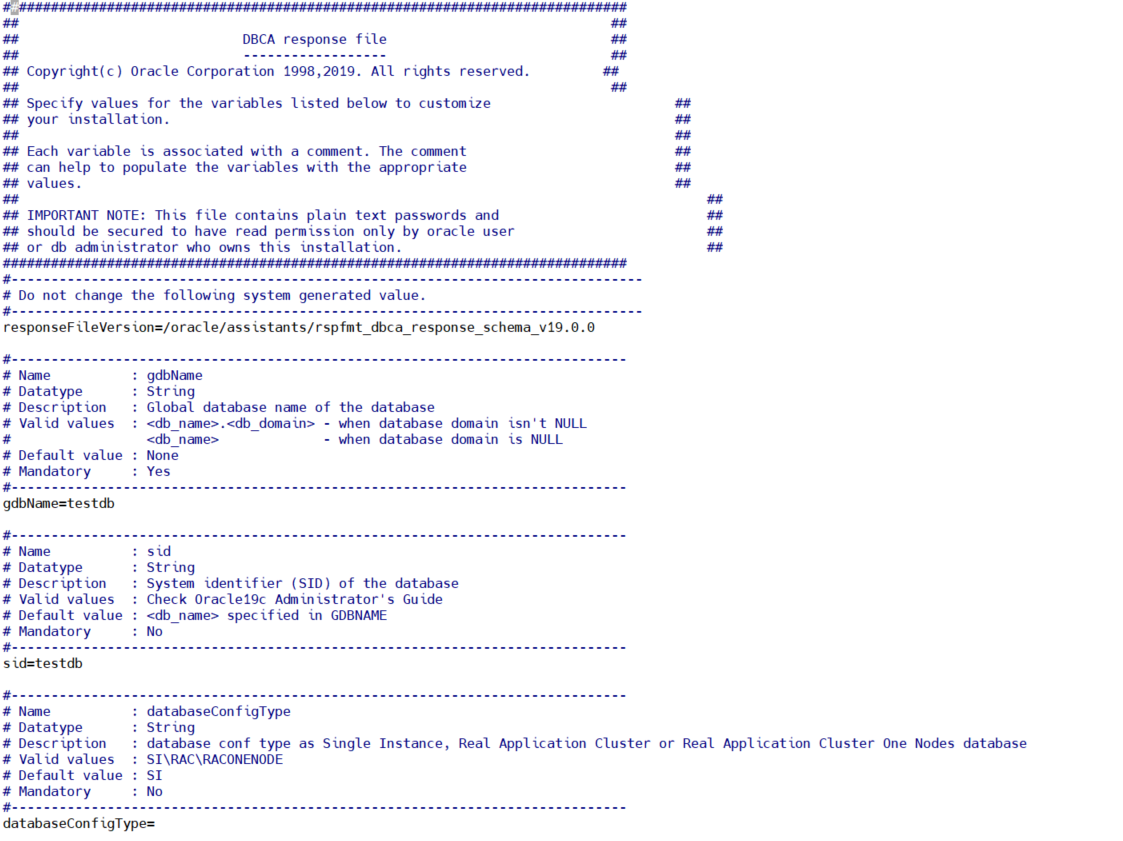
gdbName=testdb
  => Global Database Name 설정
sid=testdb
  => 데이터베이스 SID 설정
createAsContainerDatabase=false
  => 컨테이너 DB 생성 여부[필요시 true]
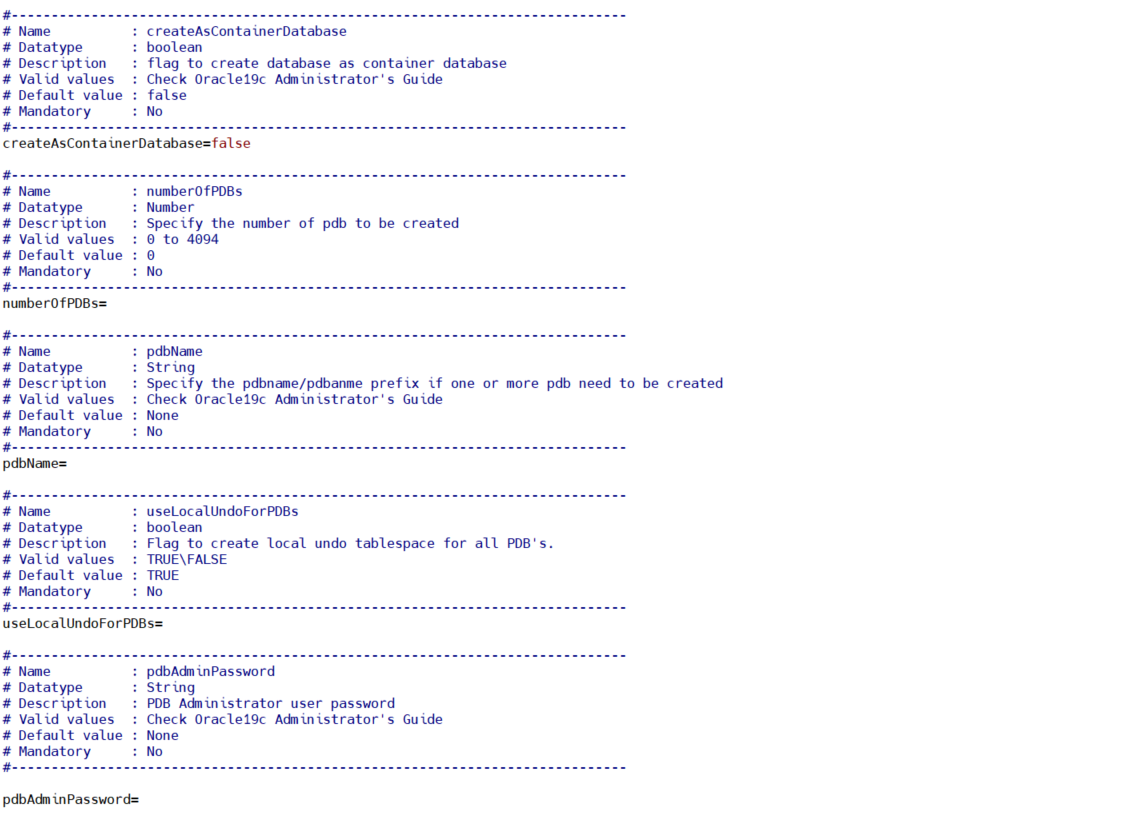
* numberOfPDBs=
  => 생성할 플러그인 데이터베이스 수(Default 0)
* pdbName=   ******
  => 플러그인 데이터베이스 이름
* useLocalUndoForPDBs=TRUE
  => 플러그인 데이터베이스의 로컬 UNDO 테이블스페이스 사용(Default TRUE)
* pdbAdminPassword=*******
  => PDB Administrator 사용자 패스워드
templateName=General_Purpose.dbc
  => 생성할 데이터베이스의 템플릿 (Data_Warehouse.dbc General_Purpose.dbc에 하나)
sysPassword=*******
  => SYS 사용자 패스워드
systemPassword=*******
  => SYSTEM 사용자 패스워드
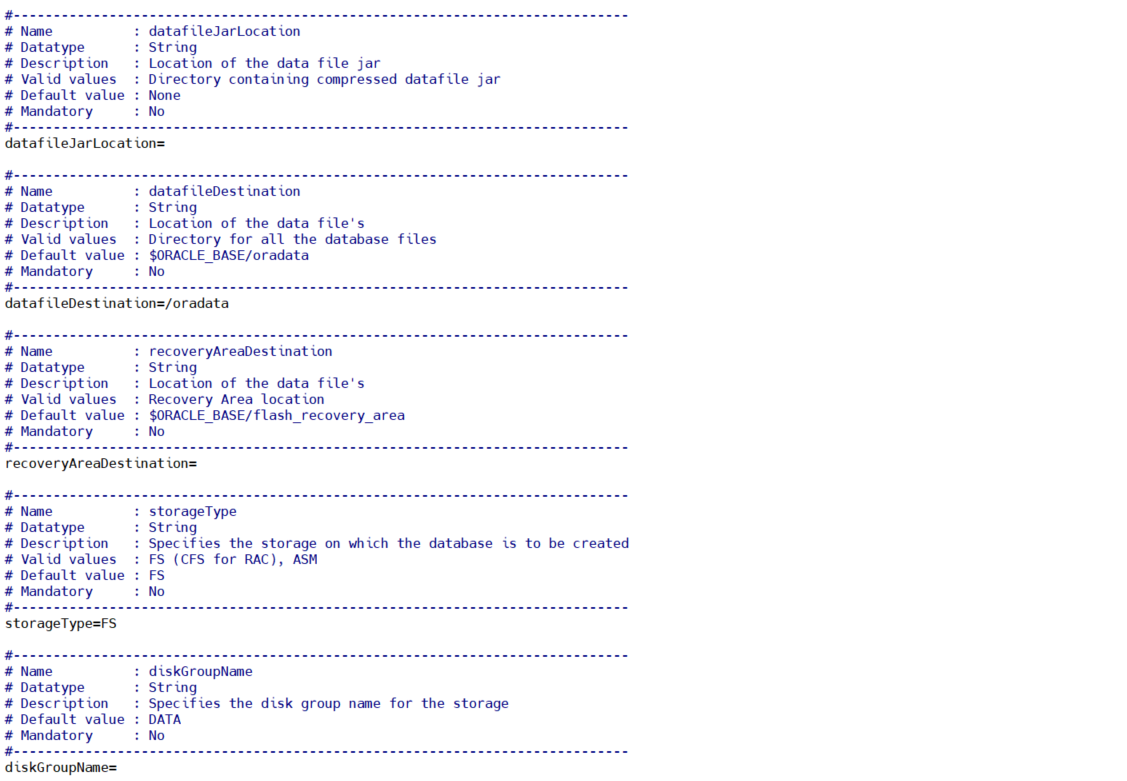
datafileDestination=/opt/oracle/oradata
  => 데이타파일위치(Default :  $ORACLE_BASE/oradata )
storageType=FS
  => 저장소 타입 설정(FS, ASM / Default FS)
characterSet=AL32UTF8
  => 문자셋 설정(Default US7ASCII)
nationalCharacterSet=AL16UTF16
  => National CharacterSet 설정(Default AL16UTF8)
listeners=LISTENER
  => 데이터베이스를 등록할 리스너 이름
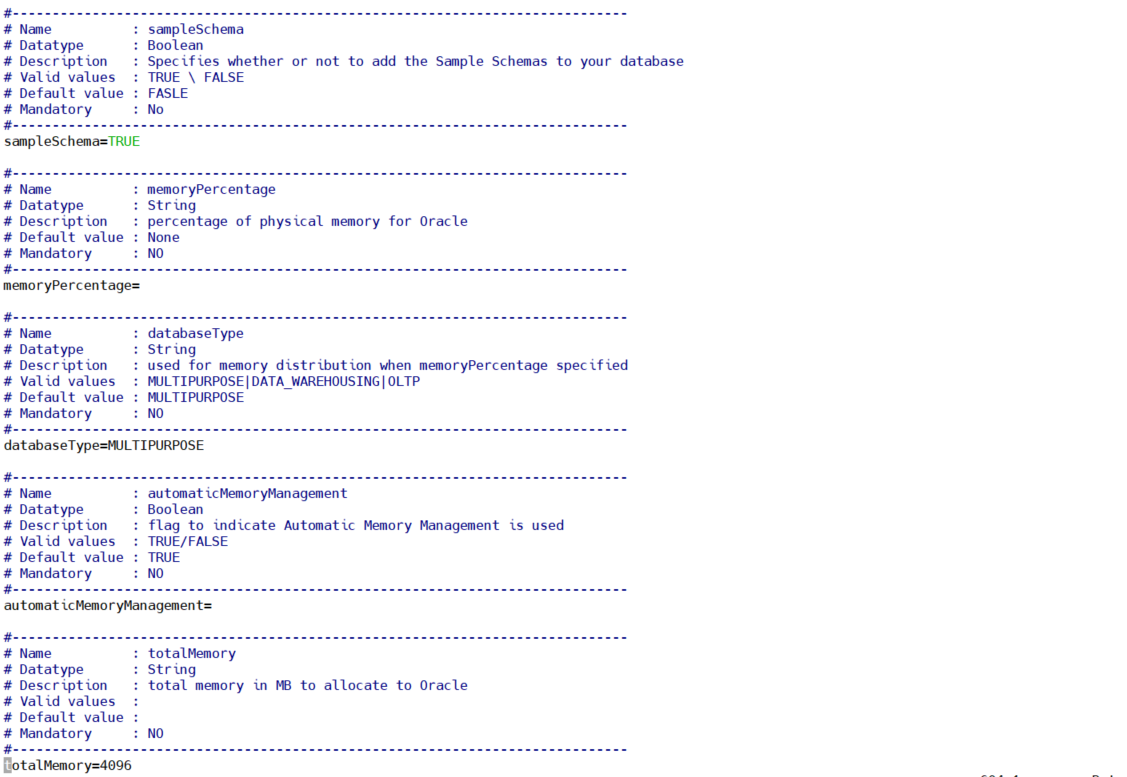
databaseType=MULTIPURPOSE
  => 데이터베이스 유형 선택(**MULTIPURPOSE**|DATA_WAREHOUSING|OLTP)
sampleSchema=TRUE
  => 샘플스키마 설치 여부 (Default False)
totalMemory=4096
  => 데이타베이스에 사용될 메모리, MB 단위
실제 파일 내용 확인(dbca.rsp)
(캡처본입니다!)


3.2 데이터베이스 설치 진행
$ dbca -silent -createDatabase -responsefile $ORACLE_HOME/assistants/dbca/dbca.rsp
실행 내역
ora19c:/oracle/app/product/193/db_1/assistants/dbca] dbca -silent -createDatabase -responsefile $ORACLE_HOME/assistants/dbca/dbca.rsp
[WARNING] [DBT-11207] Specified SGA size is greater than the shmmax on the system. The database creation might fail with "ORA-27125 - Unable to create shared memory segment error".
ACTION: Specify SGA size lesser than or equal to the shmmax on the system.
[WARNING] [DBT-06208] The 'SYS' password entered does not conform to the Oracle recommended standards.
CAUSE:
a. Oracle recommends that the password entered should be at least 8 characters in length, contain at least 1 uppercase character, 1 lower case character and 1 digit [0-9].
b.The password entered is a keyword that Oracle does not recommend to be used as password
ACTION: Specify a strong password. If required refer Oracle documentation for guidelines.
[WARNING] [DBT-06208] The 'SYSTEM' password entered does not conform to the Oracle recommended standards.
CAUSE:
a. Oracle recommends that the password entered should be at least 8 characters in length, contain at least 1 uppercase character, 1 lower case character and 1 digit [0-9].
b.The password entered is a keyword that Oracle does not recommend to be used as password
ACTION: Specify a strong password. If required refer Oracle documentation for guidelines.
Prepare for db operation
10% complete
Copying database files
40% complete
Creating and starting Oracle instance
42% complete
46% complete
50% complete
54% complete
58% complete
60% complete
Completing Database Creation
66% complete
69% complete
70% complete
Executing Post Configuration Actions
100% complete
Database creation complete. For details check the logfiles at:
/oracle/app/cfgtoollogs/dbca/testdb.
Database Information:
Global Database Name:testdb
System Identifier(SID):testdb
Look at the log file "/oracle/app/cfgtoollogs/dbca/testdb/testdb.log" for further details.
ora19c:/oracle/app/product/193/db_1/assistants/dbca]
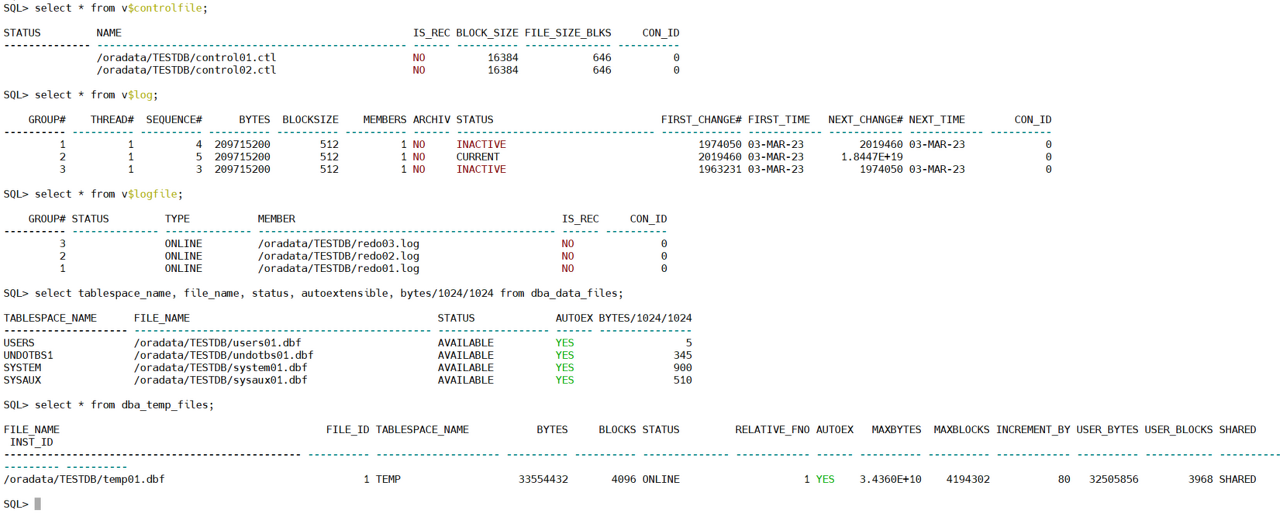
4. db 생성 완료 및 확인
(캡처본입니다!)
'Oracle > Install & Patch' 카테고리의 다른 글
| [RHEL 7.9] ORACLE_19c_Install_RAC (3) Oracle Instance 설치 (0) | 2023.05.24 |
|---|---|
| [RHEL 7.9] ORACLE_19c_Install_RAC (2) ASM 구성 및 Oracle 엔진 설치 (0) | 2023.05.23 |
| [RHEL 7.9] ORACLE_19c_Install_RAC (1) 사전설정 및 GRID 설치 (1) | 2023.05.23 |
| Oracle Patch 적용 확인 스크립트 (0) | 2023.05.23 |
| [RHEL 7.9] ORACLE_11g(11.2.0.4)_Install (1) | 2023.05.18 |


댓글